
eBay store management is the ongoing work of running a Store, not the one-time setup: keeping listings and prices current, shipping and answering buyers on time, reading seller performance, running Promoted Listings against their cost, and choosing the Store tier the sales volume justifies.
A profitable store comes from managing the full cost of each sale against margin, week after week.
Every fee and tier figure below comes from eBay’s Store selling fees page, checked for this update, and the Seller Hub facts from eBay’s own help page. The sections cover the tiers, the fee lines that change with them, Seller Hub, the operating routine, advertising, the metrics that decide profit, and where AI now helps.
The five Store tiers, and what each one costs
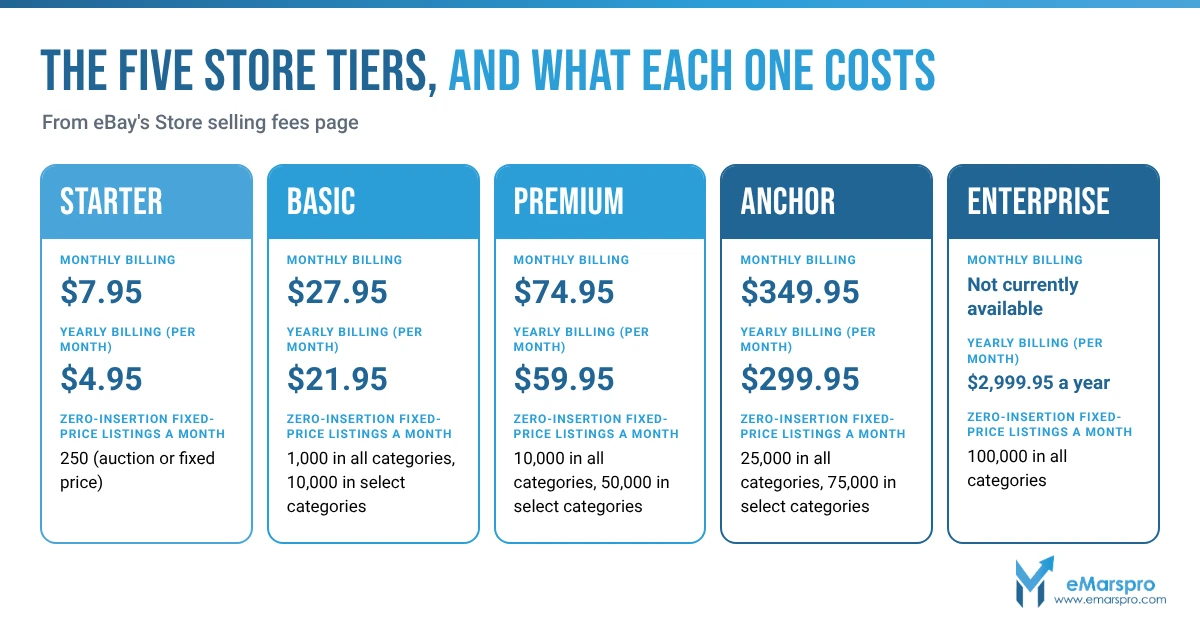
eBay’s fee page lists five Store subscriptions. The prices are per month, billed monthly, with a lower rate when you commit for a year.
| Tier | Monthly billing | Yearly billing (per month) | Zero-insertion fixed-price listings a month |
|---|---|---|---|
| Starter | $7.95 | $4.95 | 250 (auction or fixed price) |
| Basic | $27.95 | $21.95 | 1,000 in all categories, 10,000 in select categories |
| Premium | $74.95 | $59.95 | 10,000 in all categories, 50,000 in select categories |
| Anchor | $349.95 | $299.95 | 25,000 in all categories, 75,000 in select categories |
| Enterprise | Not currently available | $2,999.95 a year | 100,000 in all categories |
Three things change as you move up. The zero-insertion allowance grows, and the insertion fee after the allowance falls, from $0.30 on Starter to $0.25 on Basic, $0.10 or $0.15 on Premium and $0.05 or $0.10 on Anchor, depending on the listing format.
The final value fee also drops: in most categories Starter pays 13.6% of the total sale, and Basic and above pay 12.7%, Starter up to $7,500 per item and Basic and above up to $2,500, with 2.35% on the part above the cap.
The per-order fee is the same on every tier: $0.30 on orders of $10.00 or less and $0.40 on orders above $10.00. Category rates differ, so read your own category line on the fee page before you compare tiers; books, movies and music, for example, carry 15.3%.
The tier decision is arithmetic, not ambition. Take your last 30 days of orders, apply the two final value fee rates and the listing counts, and the right tier is the one where the saving exceeds the subscription. Our eBay account management team runs that calculation at every quarterly review, because volume moves and the tier should follow it.
Your control room: Seller Hub
Seller Hub is eBay’s management dashboard. eBay’s help page calls it the central place for managing your eBay business, says it is free to use, and notes that you need at least one sale before you can use it. Its tabs are Overview, Orders, Listings, Marketing, Advertising, Store, Performance, Research, Payments and Reports.
Three tabs do most of the management work. Performance shows sales, selling costs as a percentage of sales and traffic. Marketing holds the store tools, some of them for Store subscribers only. Research gives advice on listings, sourcing, pricing and restocking, and finding profitable products to sell on eBay shows how to use it before you buy stock.
The Store page itself
A Store subscription gives you a storefront to manage: a name, description and policies, a logo and billboard, up to 300 custom Store categories with up to 6 featured, and up to 4 rows of featured listings with 6 listings each.
eBay’s Store management page also carries the time-away setting, which lets you pause or allow sales while you are away, and two AI helpers: “Use AI description” for the Store description and “Generate with eBay” for the billboard.
The operating cadence of a profitable store
| Cadence | What gets done | Where |
|---|---|---|
| Daily | Orders shipped with tracking uploaded, buyer messages answered, cases and returns answered the same day | Orders tab |
| Weekly | Prices and stock checked against the market, ended and relisted items reviewed, promoted campaigns read against their cost, problem buyers handled | Listings, Advertising, Research |
| Monthly | Seller performance standards read, the fee lines on the invoice reconciled, the Store tier checked against volume | Performance, Payments, Store |
The daily layer protects the seller standards; the weekly layer protects margin; the monthly layer catches the slow leaks, a tier too high or a category fee misread. Blocking a buyer on eBay covers the one daily task that is easy to leave until it costs a case.
Promoted Listings: managing eBay ads over time
eBay’s advertising overview names three campaign types: promote your listings, promote your store and promote offsite. Promote your listings has two strategies, General and Priority; General charges a percentage of the sale when a promoted item sells after a click on the ad. Promoted Stores and Promoted Offsite charge per click, and Promoted Stores needs an active Store subscription.
Promoted Offsite puts eligible fixed-price listings on external channels such as Google and charges only for clicks. The monthly spend is capped at 30.4 times your daily budget (a $10 daily budget is at most $304 in a calendar month).
A sale counts if the buyer purchases any item from you within 30 days of a click. Promoted Offsite takes fixed-price listings only; auctions are not eligible.
Managing ads is a weekly read, not a set-and-forget: the ad fee is part of the cost of each sale, and a campaign that lifts volume at a rate above the margin is a campaign that loses money. The eBay Black Friday seller tips post covers the holiday version of that read.
The metrics that decide whether the store makes money
- Cost per sale: final value fee, per-order fee, shipping, promoted fee and the subscription spread over the orders. If you cannot state it per order, you do not know your margin.
- Sell-through: how fast listings turn into orders. A low rate with high stock is capital sitting in the store.
- Seller performance: the standards eBay grades you on, read monthly in the Performance tab. Falling below them is the earliest warning on the account.
- Return and case rate: the earliest signal that a listing is overpromising.
Where AI now sits in eBay store management, and what a person still decides
eBay’s own selling-with-AI page, checked for this update, names an AI description generator (select “Use AI description” when creating a listing, then use the text as it is, edit it or write your own), AI-generated backgrounds for product photos, and barcode scanning that fills in the item details.
Promoted Offsite adds AI-powered title optimization for external platforms such as Google Shopping, without changing how ad fees are charged.
What a person decides: whether the AI description matches the item in hand, which photos go live, the price, the Store tier and every ad budget.
On the accounts we run, an AI tool such as ChatGPT or Claude reads the Seller Hub exports and drafts the exceptions: listings with no views, campaigns over their cost line, returns on one SKU. A person decides what changes. AI reads, people decide.
Frequently Asked Questions
It pays when the fee savings and the listing allowance beat the subscription. On eBay’s fee page a Basic Store costs $27.95 a month ($21.95 on yearly billing), gives 1,000 zero-insertion fixed-price listings a month and cuts the final value fee in most categories from 13.6% to 12.7%. Run your last 30 days of sales through those three numbers.
Five on eBay’s fee page: Starter ($7.95 a month, $4.95 yearly), Basic ($27.95, $21.95), Premium ($74.95, $59.95), Anchor ($349.95, $299.95) and Enterprise ($2,999.95 a year, yearly billing only). Each step raises the zero-insertion listing allowance; Basic and above also pay a lower final value fee in most categories, 12.7% against Starter’s 13.6%.
Orders and messages daily, with tracking uploaded on time; listings and prices weekly, with the promoted campaigns read against their cost; the seller performance dashboard and the fee lines monthly. Seller Hub, which is free, holds all of it in one place.
Know the full cost of each sale (final value fee, per-order fee, shipping, ad fee), keep seller performance above the standards, and let the store tier follow the volume rather than lead it. A store that pays for Anchor on Basic-level sales is losing money before the first listing.
The store is a cost structure with a storefront on top
Pick the tier the volume pays for, read the fee lines monthly and the ads weekly, and keep the seller standards above the line. If you would rather have that work done for you, our eBay store team begins with a free audit of the store, findings inside 48 hours.
A Cost Structure With A Storefront On Top
Pick the tier the volume pays for, read the fee lines monthly and the ads weekly. If you would rather have that work done for you, our eBay store team starts with a free audit of the store, findings within 48 hours.