
Amazon order management is the work between a buyer’s payment and a delivered parcel: watching Manage Orders in Seller Central, confirming shipment on time, keeping the handling time honest, and handling cancellations without damaging your metrics. For FBA orders Amazon does the shipping; for seller-fulfilled orders, every step is yours.
This guide covers the four order statuses and what each asks of you, the shipment and handling-time rules as Amazon states them, and the change announced in September: orders from eBay, Walmart, TikTok and Shopify arriving on the same Manage Orders page. Every rule is from Amazon’s own pages, checked for this update.
The four statuses in Manage Orders, and what each asks of you
Amazon’s guide to seller-fulfilled orders organizes Manage Orders into four tabs. Each one is an instruction.
| Status | What Amazon says it means | What you do |
|---|---|---|
| Pending | The buyer’s payment is being processed or verified | Nothing. You cannot ship or contact the buyer until payment is confirmed |
| Unshipped | The order is ready for fulfillment | Pack and ship inside your handling time, then confirm the shipment with carrier and tracking |
| Shipped | Marked as shipped, so the buyer is updated and can track delivery | Watch for delivery problems and buyer messages |
| Canceled | Canceled by the buyer or by you | Nothing, unless inventory needs adjusting |
The tab that costs sellers money is Unshipped. An order that sits there past its ship-by date lengthens the buyer’s delivery estimate, and one that sits for a week disappears: Amazon says that if you do not confirm shipment within 7 days, it cancels the order and you are not paid.
On the accounts our Amazon account management team runs, Unshipped is checked twice a day in peak season and once a day otherwise, by a person, whatever automation sits underneath.
Confirming shipment: one order, a selection, and automatic
For one order, Amazon’s steps are: open Manage Orders, select the Unshipped tab, choose the order, select Confirm Shipment(s), and enter the carrier and tracking number. For a day’s orders, the same button handles the selection; the tracking numbers still have to be right, because a wrong one shows the buyer a parcel that never moves.
The automatic route is Amazon Buy Shipping. Labels bought there confirm the shipment with valid tracking the moment the label exists, which removes the step most sellers forget. Amazon’s guide also names its own shipping software for sellers who want labels, rates and confirmation in one place across channels.
Handling time: the setting that writes your delivery promise
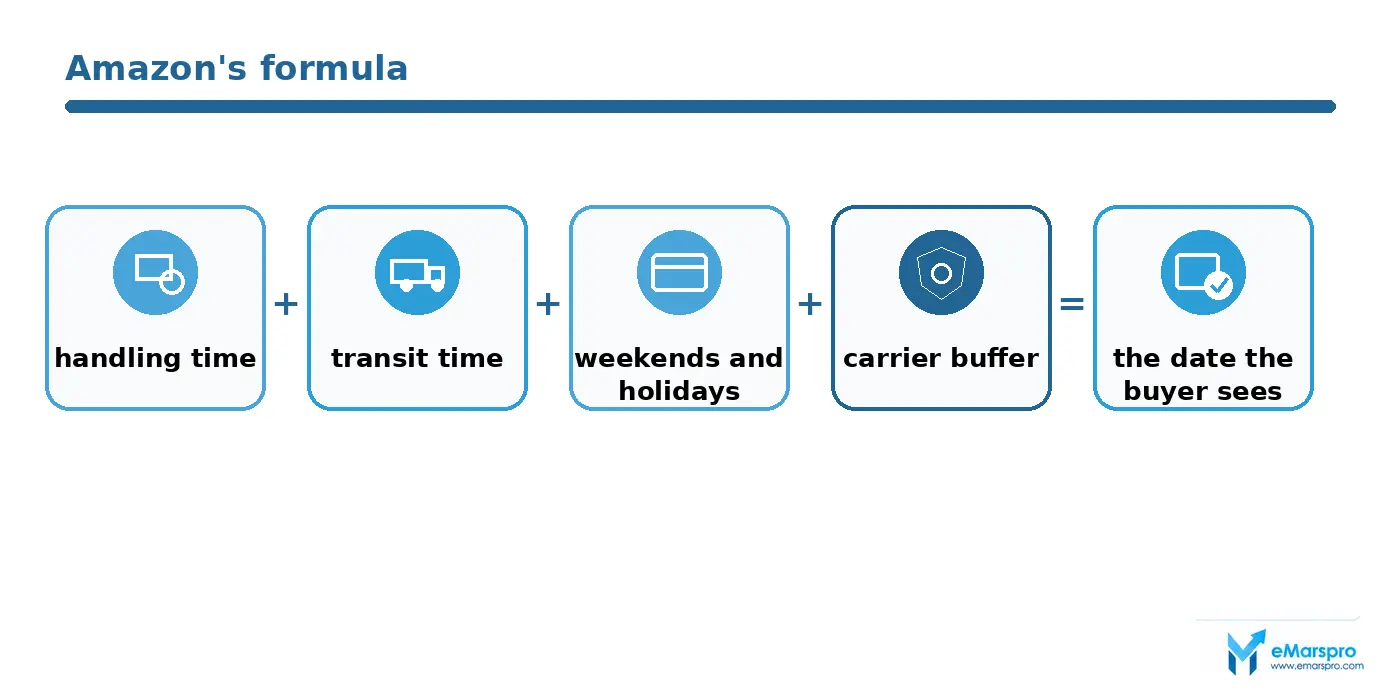
Amazon defines handling time as the time between when the customer places the order and when you hand it to a carrier. The buyer’s delivery date is that handling time plus the carrier’s transit time, plus weekends and holidays, plus a buffer for carrier delays.
Set it longer than you need and your offer looks slow. Set it shorter than you can deliver and you ship late.
Two Amazon settings keep the number honest. Order handling capacity caps the orders you can process in a day; Amazon says that when the cap is reached it adds an extra day to the handling time for further orders, so a surge does not become a week of late shipments.
Automated Handling Time sets the figure from your actual shipping history, and Shipping Settings Automation does the same for transit times.
Before the holidays, check the handling time on every seller-fulfilled SKU against the carrier cut-offs, and lengthen it the day a carrier’s last ship date passes. The delivery promise is built from this setting, so this setting is where a Christmas promise is kept or broken.
Cancellations and refunds without hurting your metrics
A buyer can ask to cancel before the order ships. Amazon says to check the request promptly and cancel if the order has not shipped, and that canceling for a buyer’s request does not count against your cancellation rate. A cancellation you initiate for your own reasons, such as being out of stock, does count.
After shipment the lever is the refund, and the metric that watches it is the order defect rate an A-to-z claim, a chargeback or negative feedback counts, a plain refund on its own does not. The post linked covers what counts and how to fix it.
FBA, seller-fulfilled, and the new multichannel orders in one view
FBA orders appear in Manage Orders but ask nothing of you; Amazon picks, packs, ships and handles the customer service. Seller-fulfilled orders ask for everything above. The division of labor is the same one you chose when you set the fulfillment method on the listing.
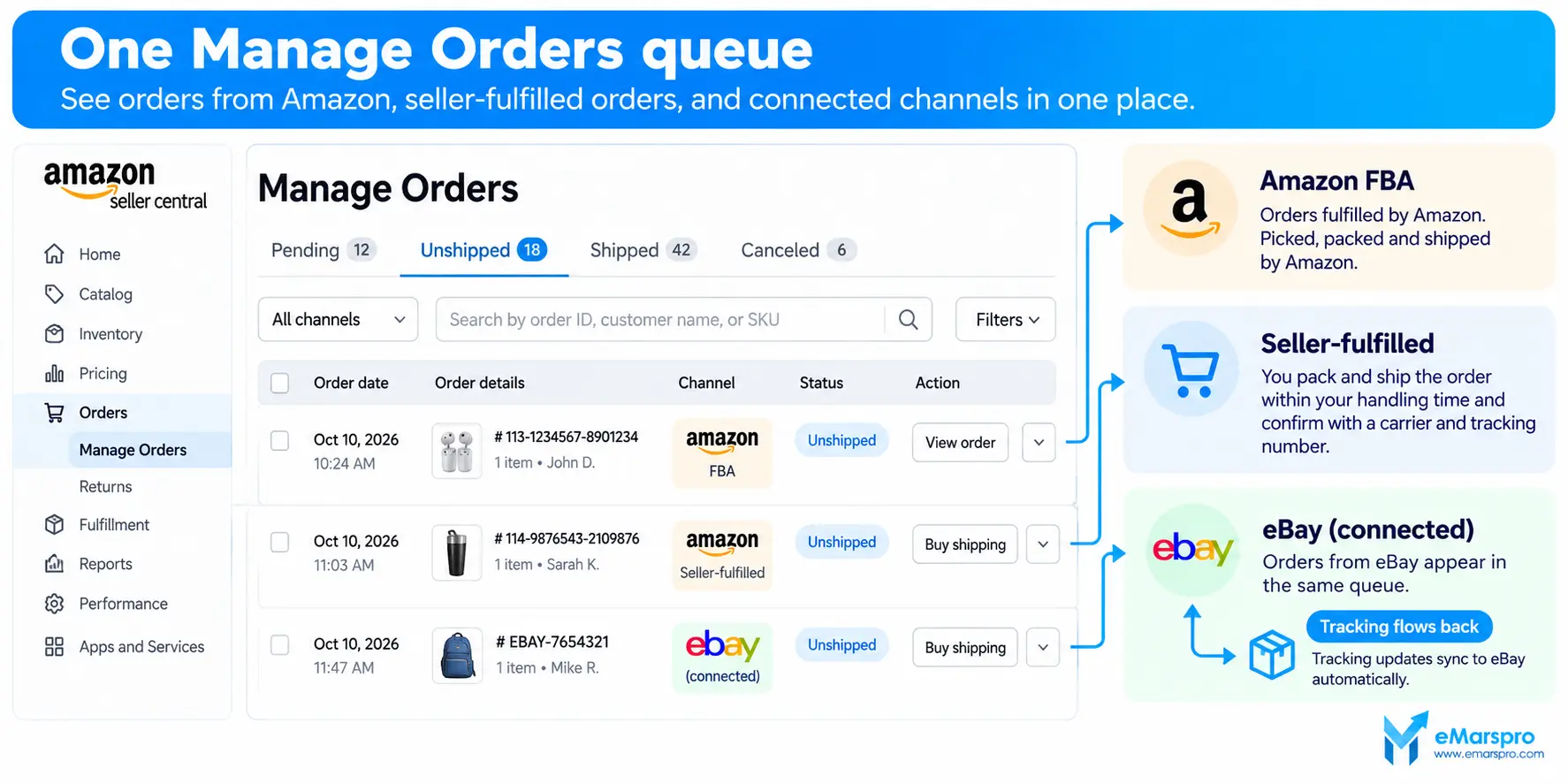
In September Amazon added a third kind of order to the same page. Its multichannel selling tools let a seller connect eBay, Shopify, TikTok and Walmart accounts to Seller Central, see unshipped orders from every connected channel on one Manage Orders page, fulfill them through Amazon, and have tracking flow back to the original channel.
Amazon says the tools roll out gradually to sellers in the US store over the coming months, at no additional cost, and that a product description edited once on Manage Products updates on every channel where the listing is live. For a brand on Amazon and three other channels, that turns four order queues into one.
Two cautions before connecting. Decide which channels share data with Amazon (you choose, and can disconnect), and keep each channel’s own handling-time setting in step with the Amazon one, because the other marketplace still sets its buyer’s delivery promise from its own setting.
How AI helps with Amazon order management
Amazon’s Seller Assistant, the AI agent inside Seller Central, can summarize orders and monitor account health, and its workflows can run routine tasks such as restocking while you are logged out, inside limits you set. Amazon’s shipping automations set handling and transit times from your history. Our tools post covers the AI tools we run alongside Amazon’s.
What a person still does: confirms that the tracking numbers are real, decides whether an out-of-stock order is canceled or back-ordered, answers the buyer who writes before the parcel arrives, and reads the order defect rate every week. AI reads the queue; a person owns the promise.
Frequently Asked Questions
Manage them from Manage Orders, which Amazon organizes into Pending, Unshipped, Shipped and Canceled. Seller-fulfilled orders wait in Unshipped until you confirm shipment with a carrier and tracking number; labels bought through Amazon Buy Shipping confirm automatically. FBA orders are picked, packed and shipped by Amazon and need no confirmation from you.
Amazon says the buyer’s payment is being processed or verified. You cannot ship the order or contact the buyer until payment is confirmed, so a Pending order needs patience, not action. It moves to Unshipped on its own once the payment clears.
Amazon says that if you do not confirm shipment within 7 days, it cancels the order and you are not paid. Confirming late also lengthens the delivery estimate the buyer sees. Buy Shipping removes the step, because a label bought there confirms the shipment with valid tracking as soon as it is created.
Yes, as Amazon’s multichannel selling tools reach your account. Amazon says sellers can connect eBay, Shopify, TikTok and Walmart, see unshipped orders from every connected channel on one Manage Orders page, fulfill them through Amazon, and have tracking flow back to the other channel. The tools are rolling out gradually to US sellers at no additional cost.
One queue, checked by a person
Order management on Amazon rewards the dull habits: a handling time that matches reality, shipments confirmed the day they leave, cancellations handled the way Amazon counts them, and one queue checked by a named person every day.
If you would rather hand that queue to a team that runs it on every account it manages that is what we do.