
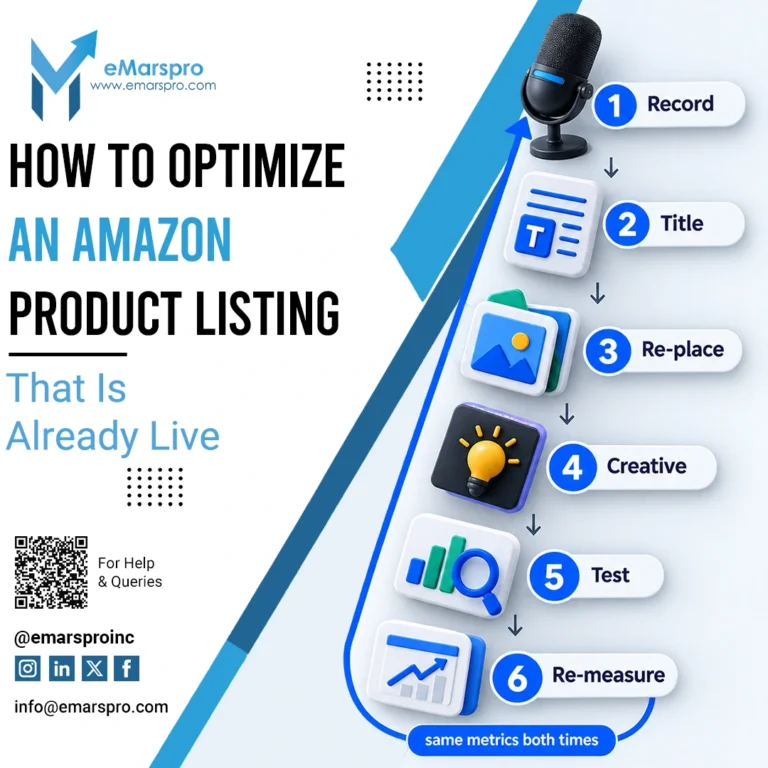
Quick answer: Optimizing an Amazon product listing means editing a page that already exists and already has numbers attached to it. Record those numbers first, rebuild the title inside Amazon’s 75 character limit, move the terms that no longer fit into Item Highlights, bullet points and backend search terms, then test the change and re-measure. Work in that order.
Most guides treat every field as equally urgent. On a live listing they are not. The title constraint changed on July 27, 2026, and that single change forces the rest of the page to move.
The optimization pass, in the order that works
| Step | What you change | The evidence it runs on | The mistake that costs most |
|---|---|---|---|
| 1 | Nothing yet. Record the numbers | Your current units, sales and conversion rate | Editing first, so you can never prove what worked |
| 2 | The title | Amazon’s published character limit | Trimming words off the end instead of rebuilding |
| 3 | Item Highlights, bullets, backend terms | The terms the title just lost | Letting displaced keywords fall off the page |
| 4 | Images and A plus content | What a shopper sees before reading | Treating the main image as the only one that matters |
| 5 | One variable at a time | Amazon’s own content test | Changing six fields at once |
| 6 | The next field on the list | The same metrics from step 1 | Calling it done |
If the listing does not exist yet, steps 1 and 5 are impossible and step 2 is premature. That is a different job, covered at the end of this guide.
Step 1: Record the numbers before you touch a field
An optimization you cannot measure is a rewrite with an opinion attached. Write down where the listing stands today, before a single character changes.
Record the same metrics Amazon will hand back to you later. Amazon’s Manage Your Experiments tool reports “units sold, sales, conversion rate, units sold per unique visitor, and sample size”, so those are the five worth capturing now.
- Units sold over a clean 30 day window, avoiding a deal or a stockout
- Sales over the same window
- Conversion rate, which is the number most edits are actually aiming at
- Units sold per unique visitor, which separates a traffic problem from a page problem
- Sample size, so you know whether the ASIN has enough volume for a test to say anything
Take a full screenshot of the live detail page as well. Six weeks from now it is the only record of what the page used to say.
Step 2: Rebuild the title inside Amazon’s 75 character limit
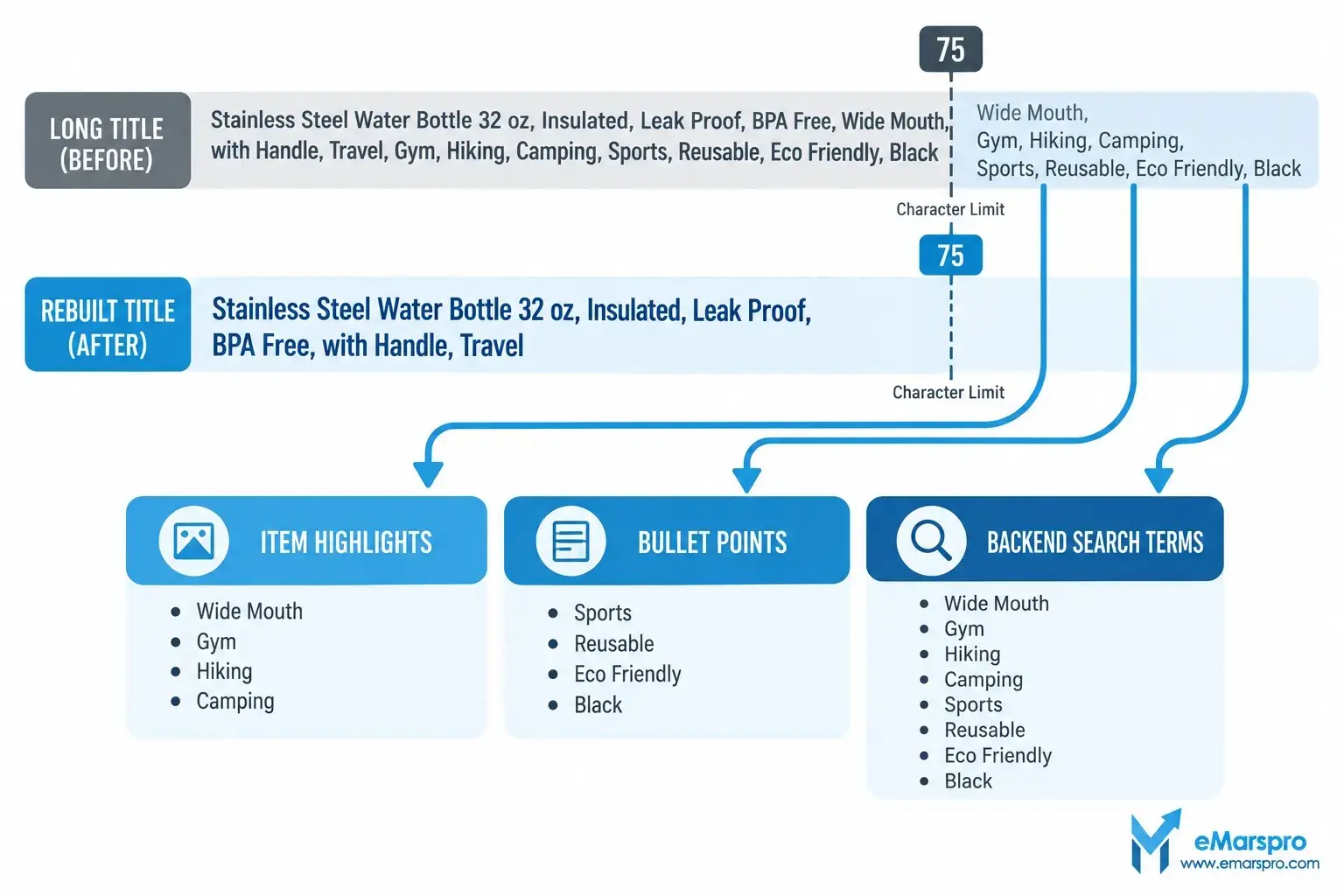
This is the field that changed, and it is the reason a listing optimized in 2024 is out of date now.
Amazon’s own announcement in Seller Central states the rule plainly.
| What Amazon states | The rule as written |
|---|---|
| Title length | 75 characters or less, including spaces |
| Categories affected | All categories except for media |
| New field introduced | Item Highlights, an additional 125 characters |
| Effective from | July 27, 2026 |
Verified at Amazon’s own announcement on August 16, 2026. Amazon’s wording: “Starting July 27, 2026, titles in all categories except for media will need to be 75 characters or less including spaces.”
A title built for the old limit is not a trim job. Cutting words off the end throws away whatever sat at the end, which on most listings is the long tail that was doing quiet work.
Rebuild it instead. What survives the cut, in this order:
- The brand, because a shopper scanning results is filtering on it before anything else
- The noun a buyer would actually type, not the internal product name
- The one qualifier that decides the click, usually size, count, material or compatibility
- Nothing else
Everything you just removed still has somewhere to go. That is step 3. Our own walkthrough of Amazon’s 75 character title rule covers the banned promotional wording in more detail.
Step 3: Re-place every term the title can no longer carry

Displaced keywords do not stop mattering because they stopped fitting. They move.
Amazon’s announcement introduces Item Highlights, which it says “provide an additional 125 characters for sharing materials or recommended use cases that help customers compare options”. That is the first place to look, and its stated purpose tells you what belongs there.
| Term type | Where it goes now | Why |
|---|---|---|
| Material, finish, fabric | Item Highlights | Amazon names materials as the field’s purpose |
| Use case, room, occasion | Item Highlights | Amazon names recommended use cases as the field’s purpose |
| Objection answers | Bullet points | The bullets are where a shopper decides, not where they search |
| Synonyms and misspellings | Backend search terms | They earn matches without taking title space |
| Anything already in the title | Nowhere | Repeating it across fields buys nothing |
The discipline that makes this work is one term, one field. A keyword repeated in the title, the bullets and the backend field has not been used three times, it has been wasted twice.
Step 4: Fix what the images and A plus content are failing to do
By this point the text is carrying the right terms. Now look at what a shopper meets before reading any of it.
Most underperforming listings have one working image and a set of decorative ones. The main image gets attention because it decides the click. The rest decide the purchase and are usually ignored.
- Secondary images should answer a question, not restate the main shot from a new angle
- Scale is the most common gap. A shopper who cannot judge size leaves
- A plus content carries the story the bullets cannot, comparison tables especially
- Anything size related should agree with the listing data. Getting this wrong changes size tier and fees, so it is worth writing Amazon product dimensions correctly before you touch anything else
Step 5: Prove the change with a test, not an argument
You now have a rebuilt page and no evidence it is better. Amazon publishes a tool for exactly this.
Manage Your Experiments, in Amazon’s words, lets you “test different versions of your product images, titles, bullet points, descriptions, and A+ Content”.
| What Amazon states about it | Detail |
|---|---|
| Account requirement | “you need a Professional selling account” |
| Brand requirement | “you need to be a Brand Representative for a brand enrolled in Amazon Brand Registry” |
| Recommended run length | “we recommend running experiments for 8 to 10 weeks” |
| What it reports | units sold, sales, conversion rate, units sold per unique visitor, and sample size |
Verified at Amazon’s Manage Your Experiments page on August 16, 2026.
Two rules make a test worth running. Change one variable, because a test of six simultaneous edits tells you the page changed and nothing else. And let it run: Amazon’s own recommended window is 8 to 10 weeks, and a result read at week two is noise.
If you are not eligible, the fallback is sequential. Change one field, hold everything else still, and compare 30 clean days against the numbers you recorded in step 1.
Step 6: Re-measure, then pick the next field
Pull the same five metrics from step 1. Same window length, same conditions, no deal running.
Then choose the next single field and repeat. Listings that improve steadily are worked one field at a time by somebody who wrote the starting numbers down.
What to fix first when the whole catalog looks broken
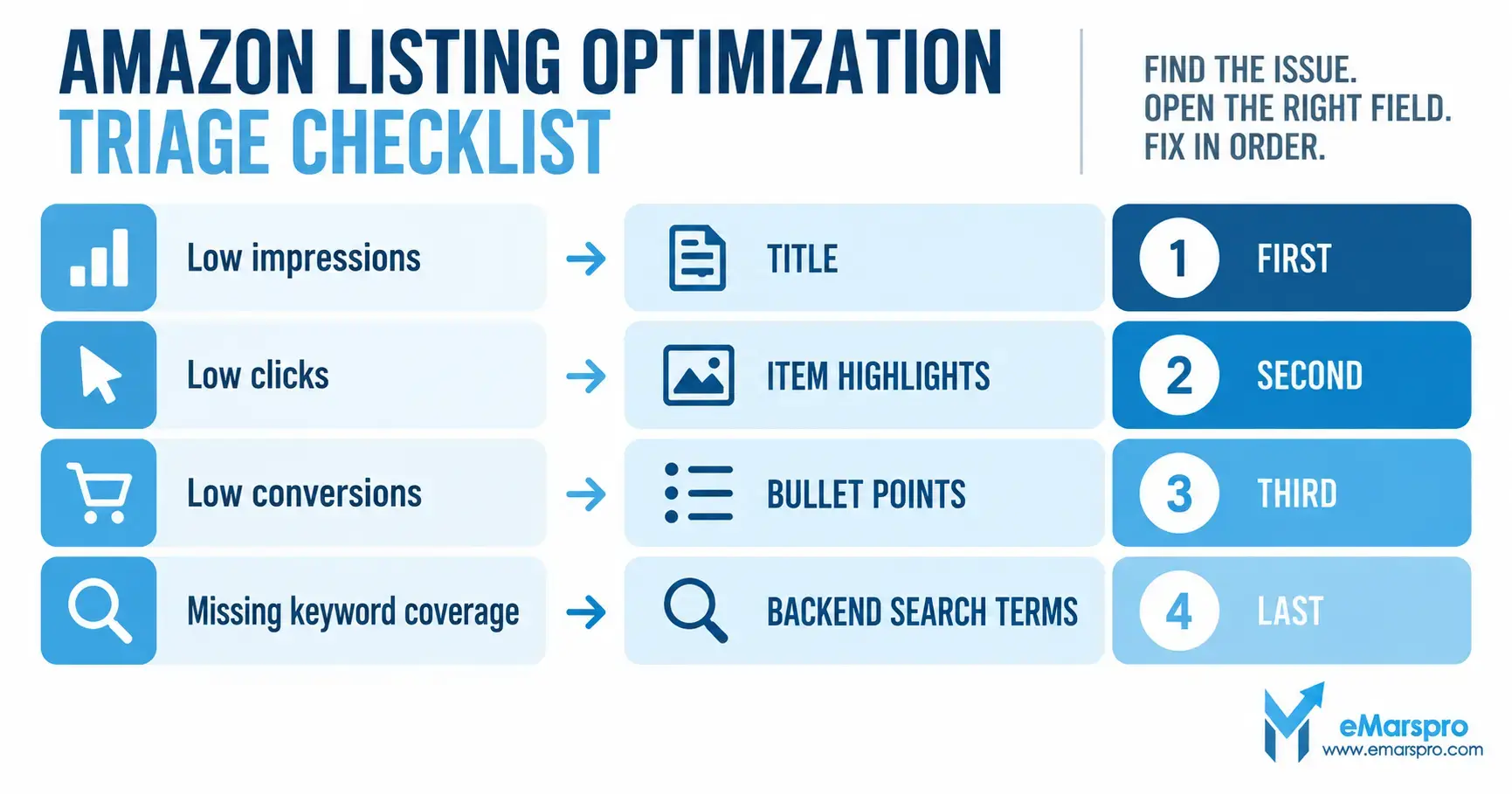
When every listing looks like it needs work, symptom decides order.
| Symptom | Open this first | Why it is first | Priority |
|---|---|---|---|
| Title reads oddly or was shortened without you doing it | Title | The limit changed and non-compliant titles do not stay as written | First |
| Impressions holding, clicks falling | Main image and title | Both sit in the search result, before anyone reaches the page | Second |
| Clicks holding, units falling | Bullet points and A plus content | The shopper arrived and then decided against it | Third |
| Listing not appearing for terms it should | Backend search terms | The hidden field is where unmatched queries usually go missing | Fourth |
Below roughly a hundred ASINs this is a list. Above it, listing errors surface as suppression alerts rather than as a weekly check, and the fix is structural rather than editorial. Our guide to Amazon catalog management covers that side.
If the listing does not exist yet, this is the wrong guide
Everything above assumes a live ASIN with performance data attached to it. Creating a listing is a different job with different tools: you decide whether to match an existing detail page or open a new one, supply a product ID, and complete the fields Amazon requires before it will publish anything.
None of that is covered here on purpose. It is covered in our guide to how to create a product listing on Amazon, which starts where this one does not.
Frequently Asked Questions
Amazon’s own announcement states that starting July 27, 2026, titles in all categories except for media need to be 75 characters or less including spaces. The same announcement introduces Item Highlights, which Amazon says provide an additional 125 characters for sharing materials or recommended use cases that help customers compare options.
Open the title first, because the character limit changed and a title that no longer fits is the one field Amazon can rewrite for you. After that, work in the order a shopper meets the page: main image, bullet points, then backend search terms. Change one field at a time so you can tell which change moved the number.
Amazon’s Manage Your Experiments tool lets you test different versions of your product images, titles, bullet points, descriptions and A+ Content. Amazon recommends running experiments for 8 to 10 weeks and reports units sold, sales, conversion rate, units sold per unique visitor and sample size. Access needs a Professional selling account and Brand Registry.
No. Creating a listing is a catalog task: you match an existing detail page or open a new one, supply a product ID, and complete the fields Amazon requires before it will publish. Optimizing is an editing task on a page that already has performance data. The two use different tools and different evidence.
Where Listing Optimization Stops Being a Spreadsheet Job
Managing hundreds of ASINs after catalog or title changes quickly becomes too much for a spreadsheet. eMarspro supports 300+ brands across 60+ marketplaces through our Amazon listing optimization service, covering title updates, backend terms, image briefs, and catalog compliance. Get a free account audit with findings delivered within 48 hours.