

An Amazon plan of action (POA) is the appeal you write to get a suspended listing or a deactivated account back. It has three parts: the root cause, the corrective actions you have already taken, and the preventive measures that stop a repeat. You submit it in Account Health, with documents that prove each part.
For account appeals, Amazon’s deactivation guide in the Seller Forums asks for exactly those three parts. Use the same structure when a listing notice asks for a plan. Below: how to write each part, what to attach, a template with a worked example, where AI helps, and the mistakes that send a plan back.
Do you need a plan of action for a listing or for your account?
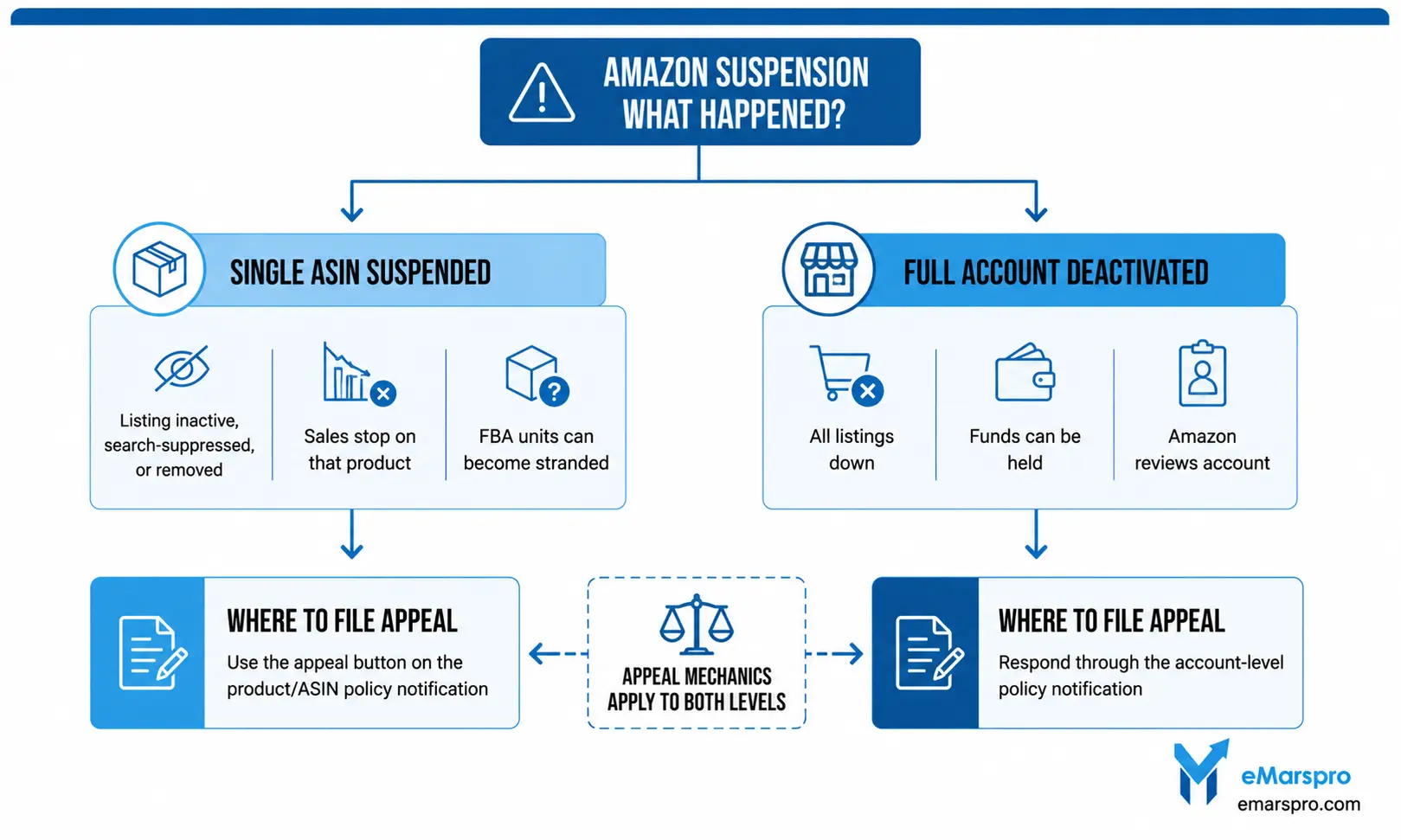
The notice tells you which: a listing notice covers one product, an account notice covers the whole business, and the structure of the plan is the same at both levels. In our cases, some notices ask only for a document, such as an approval or a rights owner’s retraction. Read what yours asks for before you write anything.
A suspended listing means Amazon removed your offer on one product. Sales on that product stop, and the rest of your catalog keeps selling. The plan answers for that one product.
A deactivated account is the bigger case. Every listing goes down at once, and Amazon’s selling policies page lists withholding of funds among the consequences. The plan answers for how the whole business runs. If your account is under review rather than deactivated, start there.
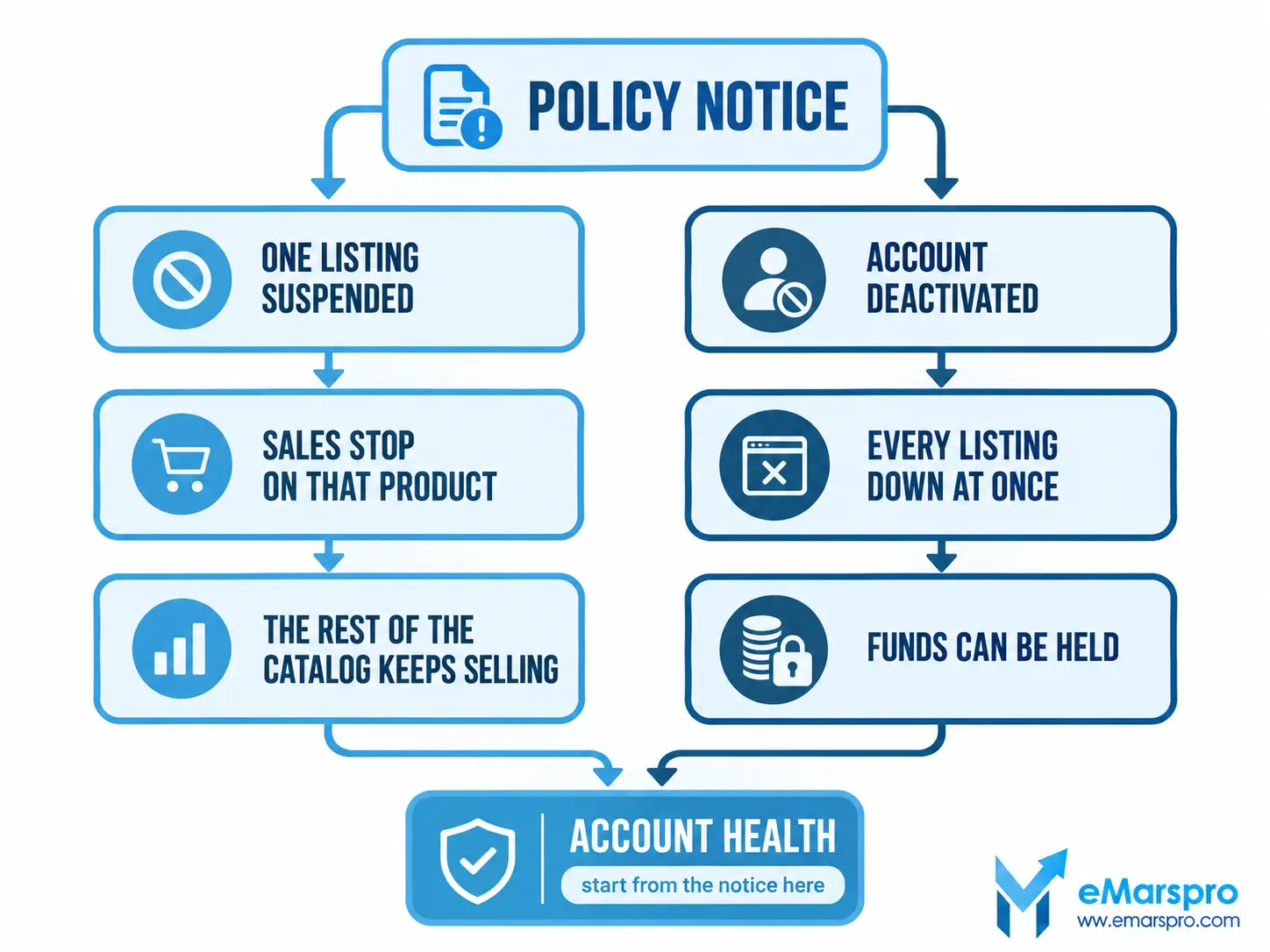
Either way, you start from the notice in Account Health. If the whole account is down, our Amazon suspension appeal team can handle the case for you.
What goes into each part of a plan of action?
Three parts, in this order, each specific enough that a reviewer can check it against your documents.
| Part | What it answers | Write it like this | Not like this |
|---|---|---|---|
| Root cause | Why it happened, in terms of what you control | “The flagged units came from a new supplier whose invoices we had not checked against our listing.” | “A buyer complained.” Or “Amazon made a mistake”, with no proof. |
| Corrective actions | What you have already fixed, with dates | “On [date] we removed the unverified units and closed the offers we could not document.” | “We will be more careful from now on.” |
| Preventive measures | The process change that stops a repeat, and who owns it | “Every new supplier now passes a document check before the first order; our operations lead signs it off.” | “We will monitor the account closely.” |
• Keep it short. Short headings and one point per line make each part easy to find. The documents carry the proof.
• Stick to facts. Leave out apologies, blame, and promises you cannot show yet.
• Answer the notice. Address the policy Amazon names, using the policy’s own wording.
How do you find the real root cause?
Start with the notice. In Seller Central, open Account Health, find the notice, and read which policy it names and what it asks you to send. Screenshot it and work from its exact wording.
Then separate the symptom from the cause. “A buyer complained” is a symptom. The cause is the thing you control: a supplier swap, a photo that oversells the product, missing safety documents, a packaging change nobody checked.
| If the notice is about | The root cause usually sits in |
|---|---|
| Authenticity or condition complaints | Sourcing: supplier invoices that do not match the listing, or used units sold as new |
| Intellectual property claims | The listing: a brand, image or design used without the rights |
| Restricted products | Approvals: the item needed an approval or documents you did not have |
| Listing policy violations | The detail page: edits, variation misuse, or prohibited claims in the copy |
| Performance | The process behind the metric: late shipment, product defects, slow replies to buyers. An order defect rate above Amazon’s 1% target is the symptom. |
If the notice is wrong, say so once, plainly, and attach the document that proves it, such as a rights owner’s retraction. Do not invent a root cause to fill the template.
If the notice is unclear, ask before you write: Amazon’s guide points sellers to the Call Me Now option on the Account Health page.
What evidence should you attach?
Every claim in the plan should point to a file Amazon can check.
| Notice type | Evidence that answers it |
|---|---|
| Authenticity or condition | Supplier invoices that match the products and quantities in question, plus supplier contact details |
| Intellectual property | A letter of authorization from the rights owner, or the rights owner’s retraction |
| Restricted or safety | The approval, compliance certificate or test report the category requires |
| Listing policy | Screenshots of the corrected detail page |
| Performance | Order and shipping records that show the process now works |
Check that every document matches your account details and the products named in the notice, and name each file for what it proves.
What does a plan of action template look like?
Use this as a structure to fill in. A finished sample written for someone else cannot hold your root cause or your fixes.
• Opening: the listing or account affected, the notice, and the date you received it.
• Root cause: one or two sentences naming the process that failed, in terms of what you control.
• Corrective actions taken: one line per fix, each with its date and the document that proves it.
• Preventive measures: one line per process change, with who owns it and how often it is checked.
• Evidence attached: each file, and what it proves.
• Close: one line asking Amazon to reinstate, with no promises beyond the measures above.
Example: a plan for an authenticity complaint
A fictional example, to show the level of detail. Write yours from your own records.
• Root cause: “Units in two orders came from a supplier we added in [month]. We listed them without checking that its invoices matched our listing and quantities.”
• Corrective actions taken: “On [date] we removed the remaining units from sale. On [date] we closed the offers we could not support with invoices. On [date] we asked the supplier for itemized invoices for every unit we still hold.”
• Preventive measures: “Before a new supplier’s first order, our operations lead checks its invoices against our listings. Every quarter we match a sample of units to their invoices.”
• Evidence attached: “Supplier invoices for the units in question, the supplier’s contact details, screenshots of the closed offers.”
How do you submit an Amazon plan of action, and what happens next?
• Submit from the notice. Amazon’s guide says to submit the plan through the Account Health dashboard. In practice, start the appeal from the notice itself and attach your documents there.
• Allow review time. For account appeals, the same guide says to allow up to 72 hours for a review. That is review time, not a reinstatement date.
• Answer quickly. If Amazon asks for more information, reply in the same case, as fast as you can.
• If it is rejected, revise. The guide says to revise the plan based on Amazon’s feedback and resubmit. Change the substance, usually the root cause or the evidence.
In practice, send one appeal per notice and wait for the answer before you send another. Your live status sits in Account Health.
Which mistakes get a plan of action rejected?
• Blaming someone else. The buyer, the supplier or Amazon. Name what you control.
• Promises without proof. “We will do better”, with nothing already fixed and dated.
• A sample or an AI draft sent as is.
• Documents that do not match. Invoices for different products or quantities than the notice names.
• Working around the problem. In our experience a new listing for the same product, or a second account, makes the case harder and can be a violation in its own right.
How AI helps with a plan of action, and where it does not
• Before the notice: Seller Assistant, Amazon’s AI agent inside Seller Central, runs workflows that monitor account health continuously, even when you are not logged in, and surfaces a recommendation with its reasoning . Any action waits for your approval and is logged. A problem fixed before it becomes a notice never needs an appeal.
• Writing the plan: a general AI tool such as ChatGPT or Claude can shorten and order a plan you wrote from your records. It cannot supply the root cause, the dates or the documents, and a reviewer checks exactly those. Write the facts first, then let the tool tighten the wording, then check every line against your records.
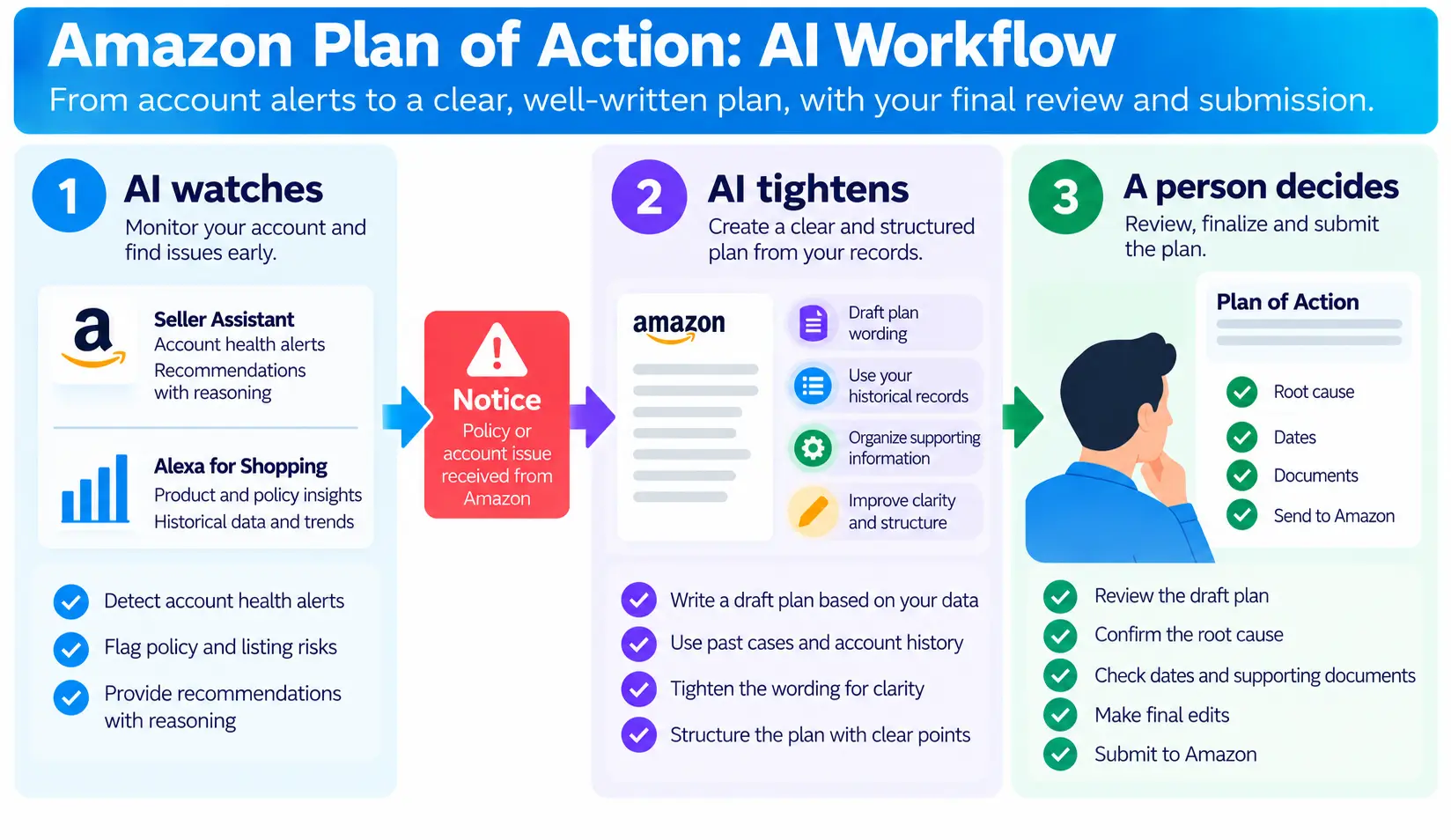
What a person decides: the root cause, every date, every document, and whether to send.
When should you get help with your plan of action?
If the listing is still down after your first appeal, or the product or account carries real revenue, bring in experienced help before the appeal history gets messy.
For a suspended listing, our Amazon listing reinstatement team handles the appeal for that product. For a deactivated account, our Amazon suspension appeal services team takes the case. Both start with a free 48-hour audit.
How do you stop the next suspension?
Keep the preventive measures from your plan running after reinstatement: they are now part of the routine.
Watch your Account Health Rating, Amazon’s color-coded score from 0 to 1,000. Amazon’s guide puts Healthy at 200 to 1,000, At Risk at 100 to 199, and below 100 as Unhealthy; new sellers start at 200. How the score moves is in our Account Health Rating post.
• Work every new violation as soon as it appears; Amazon’s guide says to check the dashboard daily and address violations within 24 hours.
• Read the Voice of the Customer dashboard, which Amazon’s account health guide recommends: in our experience repeated “not as described” complaints on one product are the early warning, so fix the cause before it becomes a violation.
• Know the account health thresholds that put an account at risk: ODR, late shipment, cancellation, tracking and delivery.
Frequently Asked Questions
The root cause in one or two sentences, each corrective action with its date, and each preventive measure with an owner. Attach the documents behind every line, such as supplier invoices or a letter of authorization, and keep the letter itself short.
For account appeals, Amazon’s deactivation guide in the Seller Forums says to allow up to 72 hours for the review. A rejected plan has to be revised and resubmitted, so a complete first submission saves the most time. For a listing notice, watch the case in Account Health.
Usually, yes. Amazon’s guide says to revise the plan based on the feedback and resubmit. Change the substance, not the wording: usually the root cause or the evidence. If Amazon’s reply says the decision is final, get advice before you send anything else.
Yes, for structure. Fill every line from your own records. A reviewer needs your root cause and your fixes, which no ready-made letter contains.
It can tighten a plan you wrote from your records; it cannot write one for you, because no AI tool has your invoices, your dates or your supplier. Amazon’s own Seller Assistant monitors account health and flags problems, which can bring one to you earlier. The plan is still yours to write.
Three parts, your records
A plan of action is short because the documents do the work. Root cause, fixes with dates, measures with owners, and a file behind each line. Written that way, a reviewer has something to check instead of something to doubt.