

AI tools for Amazon sellers divide into two groups in 2026: the AI Amazon builds into Seller Central, which reads your account directly, is free and can now act with your permission; and the paid tools that do one job each.
Managing an account with AI means putting the first group to work before paying for the second, and deciding what no tool is allowed to decide.
This guide covers what Amazon’s own AI does now, the plugin that puts your account data inside Claude or Amazon Quick, the paid tool categories by job, and the decisions that stay with a person. Every Amazon capability below comes from Amazon’s own pages, checked for this update.
1. Start with Amazon’s own AI (free)
Amazon’s AI page for sellers describes Seller Assistant as an always-on, agentic AI expert that can find information, develop strategies and take action on a seller’s behalf, and says sellers accept its recommended actions over 90 percent of the time.
It opens from the Ask Seller Assistant button in Seller Central; the launch name, Project Amelia, survives only in an old Amazon URL.
What it does today, from Amazon’s announcements: it monitors account health and surfaces issues and the actions to take; it helps complete compliance documentation; it monitors inventory levels; and it drafts Sponsored Products and Sponsored Brands campaigns from a readiness check. Our Amazon Seller Assistant post covers it job by job.
Amazon’s September 2026 announcement added the parts that make it a manager’s tool rather than a chat box: persistent memory of your business, and workflows you describe in plain language that run while you are logged out.
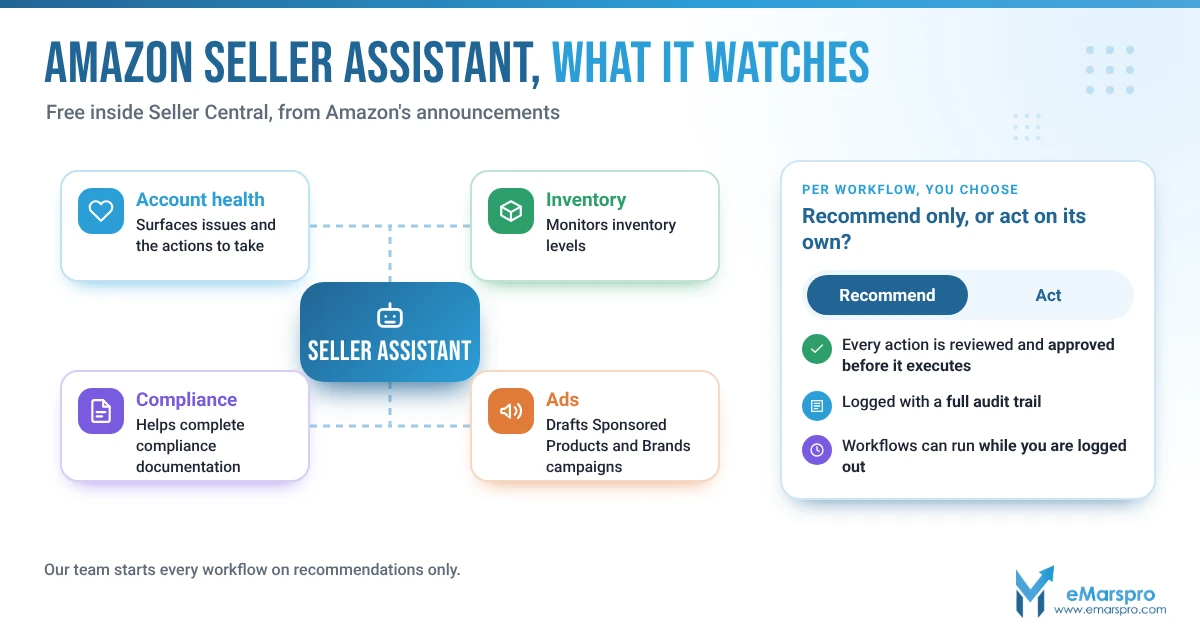
For each workflow you choose whether it recommends or acts, you set the guardrails, and Amazon says every action is reviewed and approved before it executes and logged with a full audit trail. Amazon’s own examples: an alert when a product drops below four stars; a price adjustment and a listing refresh when a competitive opening appears.
Our Amazon account management team sets every workflow to recommendations only first and reads what each would have done before it moves to act mode. The workflows that would have made the same call as the account manager move; the ones that would not stay on recommend.
The rest of Amazon’s AI, by job:
- Listings: Enhance My Listing drafts titles and attributes; Amazon’s AI listing tools write titles, bullets, descriptions and more than 70 percent of required attributes from a few words, an image or a URL, and the seller reviews and approves before submitting.
- A+ Content: the A+ Content Generator fills the AI Ready modules with text and images from a brand-owned ASIN; Amazon says you remain responsible for the result.
- Ads: Creative Studio and Creative Agent draft image and video creative; the AI Video Ad Creator turns an ASIN into a Sponsored Brands video; auto-optimization adds performing search terms, pauses underperformers and holds bids under a maximum the seller sets. Amazon’s line at Accelerate 2026: nothing happens without approval.
- Product selection: Product Opportunity Explorer; our AI keyword research for Amazon post covers the keyword side.
- The buyer side: Alexa for Shopping, Amazon’s AI shopping assistant, reads the listing and recommends; our Alexa for Shopping post covers what a listing has to give it.
The plugin: your account inside Claude or Amazon Quick
The same September 2026 announcement introduced the Amazon Selling Partner plugin. In Amazon’s description it connects listing contributions, real-time performance metrics, inventory and sales analytics to an AI agent outside Seller Central: Amazon Quick, or Anthropic’s Claude, with the Claude integration in beta, for sellers in Amazon’s US stores.
Amazon says the agent can read the data and take actions with human approval, and that connecting Claude takes about 60 seconds with no coding. In Quick, Amazon says, the agent shows its planned actions and waits for approval.
Amazon paired it with an offer: the primary account holder who signs up by December 31, 2026 gets 12 months of Amazon Quick Plus free, plus two delegated users. What it costs after the year is not stated on Amazon’s pages.
For an account manager the plugin changes the daily read. The questions that used to need three exports (which ASINs are inside ten days of stockout, which lost sales week over week, which listings lost the Featured Offer overnight) become one question to the agent, answered from the connected data, with any action waiting for a yes.
2 to 7. The six paid tool categories worth evaluating
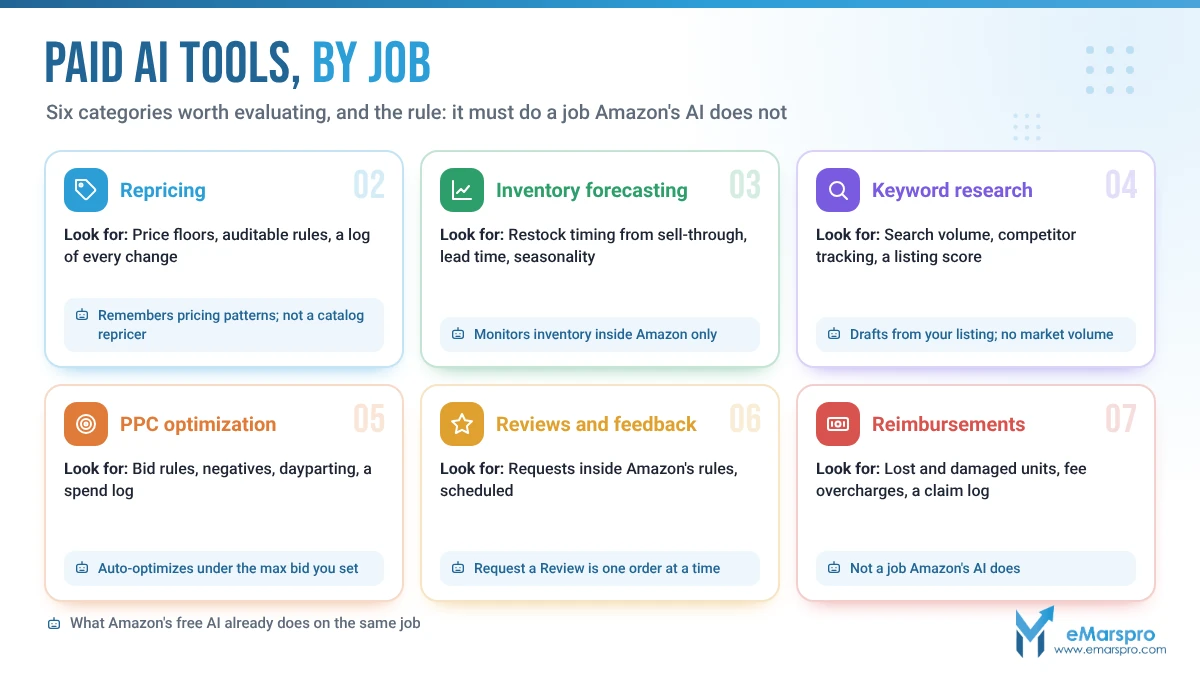
Seller Assistant reads one account; it does not report keyword search volume across the market (Product Opportunity Explorer shows niche demand, not a listing score) and it has no reimbursement function. The paid tools earn their place on those jobs; our best AI tools for eCommerce post lists the ones we run across marketplaces, each checked at its own site.
The rule for buying one: it must do a job Amazon’s free AI does not, and someone must read its output weekly.
2. Repricing automation
Price floors, auditable rules and a log of every change. Seller Assistant remembers your pricing patterns and runs approved workflows; it is not a repricer across a catalog of competitors.
3. Inventory forecasting
Restock timing from sell-through, lead time and seasonality across suppliers. Seller Assistant monitors inventory levels inside Amazon; a forecasting tool reads the supply side too.
4. Keyword and listing research
Keyword search volume, competitor tracking and a listing score you can act on. Seller Assistant and Enhance My Listing draft from your listing; Product Opportunity Explorer shows niche demand, not a listing score.
5. PPC optimization
Bid rules, negative-keyword mining, dayparting and a spend log you can audit, across every campaign. Amazon’s auto-optimization works inside Amazon’s own console under the maximum bid you set.
6. Review and feedback management
Requests inside Amazon’s rules, scheduled across orders. Amazon’s Request a Review button does one order at a time; a paid tool schedules it, and any tool that incentivizes a review is a risk to the account.
7. Reimbursement detection
Lost and damaged inventory, fee overcharges and a claim log. Not a job Amazon’s AI does.
What AI still cannot do
Run with AI, under approval: the daily account health read; stockout dates per ASIN; listing drafts; ad creative drafts; search-term harvesting; the first draft of a plan of action. Our Amazon account audit checklist post is the list of reads AI now does first.
Decided by a person: what the account is for this quarter; what it may spend and where the margin floor sits; which products launch and which stop; whether a policy fight is worth having; what goes to Amazon in a case; and who owns the result.
Amazon’s own tools stop for approval before any action; these decisions come before the tool is asked.
On the accounts we run, ChatGPT or Claude read the exports Seller Assistant does not yet reach and draft the exceptions list; Seller Assistant drafts inside Seller Central; a person decides every change. AI reads, people decide.
Frequently Asked Questions
Yes. Seller Assistant in Seller Central is free and is what Amazon calls an always-on agentic AI expert: it finds information, develops strategies and, with your permission, takes action. Beside it sit Enhance My Listing, the A+ Content Generator, the AI Video Ad Creator, Creative Agent and Product Opportunity Explorer, all named on Amazon’s AI page for sellers.
Start with Amazon’s own, because it reads your account directly and costs nothing, then add a paid tool only for a job it does not cover: keyword research against search volume, bid automation across campaigns, repricing, reimbursement detection. The smallest stack that covers the gaps is the best one; a tool nobody reads weekly is a cost.
Not the decisions. Amazon designed Seller Assistant to recommend, or to act only inside guardrails a seller sets, with every action approved and logged. What it replaces is the reading: the daily checks of inventory, pricing, account health and ads. Someone still decides what the account is for, what it may spend, which risks it takes, and owns the result.
No. Rufus is not a seller tool; Amazon’s pages today name Alexa for Shopping as its AI shopping assistant for buyers. It reads your listing and recommends products to shoppers, which is why complete listings matter. The seller-side tool is Seller Assistant, inside Seller Central.
The stack is not the strategy
Set each Seller Assistant workflow to recommend only until it has earned act mode, connect the plugin if you work in Claude or Quick, add a paid tool only for a job Amazon’s AI does not do, and keep every decision with a person who owns the result.
If you would rather have that layer run for you, the team that runs these accounts begins with a free audit of the account, findings inside 48 hours.
Put AI to Work on Your Amazon Account
Our Amazon account team sets up Seller Assistant workflows and the tools around them, and starts with a free account audit, findings within 48 hours.