
Optimizing Amazon advertising campaigns comes down to eight moves: clean structure, scheduled search-term reviews, negative keywords, SKU-level bids, placement multipliers, budget pacing, listing conversion, and honest measurement. That is the whole list. The urgency banners, AR try-ons and gamified quizzes filling generic advice posts are not things Amazon ads support, and we cover that below.
1. Structure Campaigns So the Data Can Tell You Something
One product family per campaign, tightly themed ad groups, and a naming convention a stranger could read. Structure is not housekeeping. When three campaigns overlap the same targets, your data fragments across them and the reports blur into noise nobody can act on.
If your account grew by duplication, restructuring is usually the highest-return move available, and it costs nothing but care. We walked through the architecture in our campaign structure guide.
2. Review Search Terms on a Schedule, Not a Mood
The search term report is where the truth lives: the real queries your ads showed for and what each one did. Weekly review, two questions. Which terms convert and deserve their own exact targets? Which terms spend and never convert?
The second list is where budgets quietly die. Zero-conversion spend of 8 to 20 percent of total spend is the range we keep finding on unaudited accounts, a number we document in our published 15-point PPC audit.
The schedule matters more than the depth. A shallow weekly pass beats a heroic quarterly one, because waste compounds daily and converting terms drift as competitors move. Put it on the calendar like payroll.
3. Feed the Negative Keyword List Every Week
Negatives are the cheapest optimization on Amazon. Every search term that spends without converting becomes a negative exact; whole themes that never fit become negative phrase. The budget you stop wasting funds the bids that work. Our negative keywords guide covers the mechanics.
Set a spend threshold before you judge a term, so you cut on evidence rather than impatience: enough clicks to know it does not convert, not two clicks and a bad mood. And review the negative list itself each quarter; a term that deserved blocking in March can deserve a second chance in Q4.
4. Set Bids From SKU-Level Returns, Never Account Averages
A healthy account average hides your best and worst performers. Bid decisions belong at the SKU and target level, measured against that product’s own baseline. Raise in small steps where return is strong and inventory can support growth. Cut ahead of the curve where the trend is turning.
This is the single move most weekly routines miss, because averages look fine while winners sit underfunded. The test is simple: if you cannot name your three highest-return SKUs and what share of spend they get, bids are being set by history, not by performance.
5. Earn Placement Multipliers With Data
Top of search converts differently than product pages, and the difference is not the same for every product. Read placement reports first, then set multipliers where the premium pays back. A multiplier set by hope is just a raise for Amazon.
Work one placement change at a time per campaign and give it a full week of data before judging. Stacked simultaneous changes produce reports nobody can interpret, and unreadable reports are how accounts drift back to guessing.
6. Pace Budgets to the Calendar
Budgets that run out at noon hand the evening to competitors. Budgets that never run out are usually underbidding. Watch when campaigns exhaust, rebalance budgets toward what those patterns show, and plan Q4 budgets in September, before auction pressure builds. Native scheduling controls are limited, so the lever is reading exhaust times, not pretending to daypart.
Budget is also a message to yourself: a campaign that keeps earning its budget increase after increase is telling you where the catalog’s real demand lives. Listen to it when you plan inventory, not just ads.
7. Fix the Listing Before You Scale the Spend
Ads buy the click. The listing makes the sale. Scaling spend on a listing with weak images, thin content or bad reviews buys the problem more traffic. When conversion is the bottleneck, listing optimization is ad optimization, and it comes first.
A fast way to spot it: compare a product’s ad conversion rate against its own organic rate. When paid traffic converts far below organic on the same listing, the targeting is wrong. When both are weak, the listing is the problem, and no bid fixes that.
8. Measure Honestly: ACoS, TACoS, and What Each Hides
ACoS judges the ad in isolation. TACoS judges advertising against total sales, which catches the organic lift ads create. Track both per product family. A rising TACoS with flat sales means ads are replacing organic, not adding to it, and that is a strategy question, not a bid question. Our ACoS guide covers the targets.
What Does NOT Work in Amazon Advertising
Plenty of advice for this topic describes things Amazon sponsored ads cannot do. For clarity, none of these exist in Sponsored Products, Brands or Display:
- Custom urgency banners or countdown timers inside the ad.
- Augmented reality try-ons and gamified quizzes.
- Custom review badges or testimonial overlays.
- Free-form geo-targeted ad copy per city.
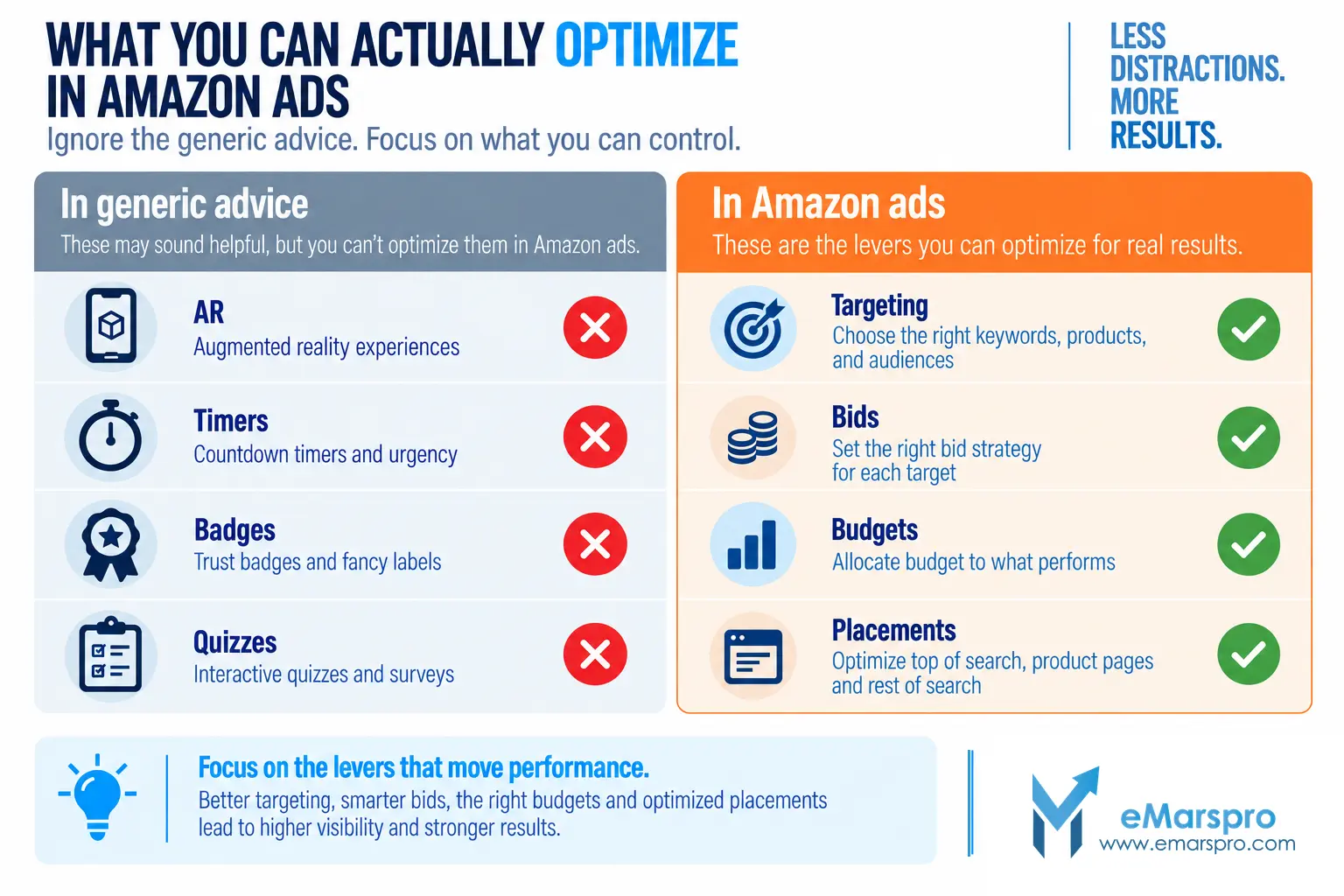
What you control is targeting, bids, budgets, placements, and the creative formats Amazon actually offers. Optimization lives there. If a tactic does not map to a real campaign setting, it is content filler, not strategy.
We inherit accounts most months whose previous optimization plan was exactly that kind of list. The tell is always the same: months of activity in the notes, and no change in the search term report.
Where AI Fits in Amazon Advertising Optimization
Amazon runs AI on both sides of the marketplace now: Alexa for Shopping (formerly Rufus) shapes discovery, Amelia assists sellers in Seller Central, and Performance+ and Brand+ apply machine optimization inside Amazon’s DSP. Third-party tools add rules and analysis on top.
The useful division of labor: machines read the data at a scale no team can match, people make the calls with the context machines cannot see, like inventory, margins and listing health. Rules-based automation polices single metrics. AI-assisted reading finds patterns. Neither replaces judgment.
Frequently Asked Questions
The ad did its job and the listing did not, or the traffic is wrong. Check the search terms behind those clicks first: irrelevant queries convert nowhere. If the terms are relevant, the bottleneck is the listing: price, images, reviews, or content.
In order of impact: cut zero-conversion search terms, tighten targeting so you stop paying for irrelevant clicks, improve listing conversion, then rebalance bids per SKU. Chasing a lower ACoS with bid cuts alone usually just shrinks sales.
Check in this order: campaign active and in budget, bids competitive for the placement, targets with real search volume, and the listing eligible for the Buy Box. Most impression droughts are one of those four, and only the bid one costs money to fix.
Reads can be daily; changes should be weekly and staged. Daily bid-flailing chases noise. The working rhythm is a weekly decision pass on SKU-level data, with seasonal planning ahead of Q4 and Prime events. If the eight moves read like more than your team has time to run, that is the honest case for help. Our Amazon PPC management team runs these exact moves for sellers, and it starts with a free audit.
Get Your Free Amazon Account Audit
If the eight moves read like more than your team has time to run, that is the honest case for help. Our Amazon PPC management team runs these exact moves for sellers, and it starts with a free audit.
We review your listings, PPC and account health, and send findings within 48 hours.