

Quick answer: The Amazon FBA calculator, officially the Revenue Calculator, is Amazon’s free tool for previewing fees, costs, and estimated net profit before you commit inventory. It lives behind Amazon’s Estimate fees and costs page and compares FBA against fulfilling orders yourself. It is a preview, not an accounting system: real margin still needs tracking after launch.
This guide shows where the calculator lives in 2026, how to run it in five minutes, which costs it previews versus which hit your statements later, and the weekly margin check that turns estimates into decisions.
Where the Amazon Revenue Calculator lives now
Amazon’s current entry point is its Estimate fees and costs page, which describes the tool in one line: calculate fees, costs, and revenue for a current or future product, comparing Fulfillment by Amazon and your own fulfillment method. The calculator itself opens in Seller Central from that page.
Two things worth knowing before you click:
- You can search Amazon’s catalog for an existing product, or define a new one by entering its category, dimensions, weight, and price.
- The old standalone address for the tool now returns a 404, so ignore any guide pointing at sell.amazon.com/tools/revenue-calculator.
How to use the FBA calculator in 5 minutes
Amazon’s own walkthrough on its Seller blog (updated August 2025) breaks the tool into three moves. Here is the working version:
| Step | What you do | Watch out for |
|---|---|---|
| 1. Add the product | Search by ASIN, UPC, ISBN, or title, or define a new product with dimensions and category | Wrong category means wrong referral fee estimate |
| 2. Enter your numbers | Sale price, cost of goods, monthly units sold, estimated units in storage, plus your own shipping costs in the comparison column | Use landed cost per unit, not the factory quote |
| 3. Estimate and compare | The tool returns estimated net profit and net margin for each fulfillment scenario, with a third column for an alternate scenario | Run a pessimistic case: lower price, slower sales |
Ten minutes here beats ten weeks of selling a product that never had margin. If you are still choosing what to buy, pair this with our sourcing playbook before any purchase order goes out.
The fee numbers you can trust today
Every figure below was checked today, August 16, 2026, at sell.amazon.com/pricing. Anything not listed there changes often enough that you should pull it live rather than trust a blog screenshot.
| Cost | Current public figure | Source status |
|---|---|---|
| Individual selling plan | $0.99 per item sold | Verified today |
| Professional selling plan | $39.99 per month | Verified today |
| Referral fee, most categories | 15%, with a $0.30 minimum per item | Verified today |
| Referral fee range examples | 8% (full-size appliances) up to 45% (Amazon device accessories); clothing runs 5% to 17% by price | Verified today |
| Closing fee, media categories | $1.80 per item | Verified today |
| FBA fulfillment, storage, aged inventory, returns processing, inbound placement rates | Not published on the public pricing page | Pull current rates from the FBA fee pages in Seller Central or inside the calculator itself |
That last row is deliberate. Older guides, including the previous version of this post, hardcoded storage rates that no longer match Amazon’s published numbers. Rates move; your process should assume it.
What the calculator previews versus what hits later
The calculator previews the big three: referral fee, FBA fulfillment fee, and monthly storage, plus closing fees where they apply. Amazon’s own walkthrough is candid that some costs are not built in, long-term storage among them.
Costs that commonly appear on statements after launch:
- Aged inventory surcharges once units sit past 181 days
- Returns processing, and refund-related costs when buyers send items back
- Inbound placement and prep charges on the way in
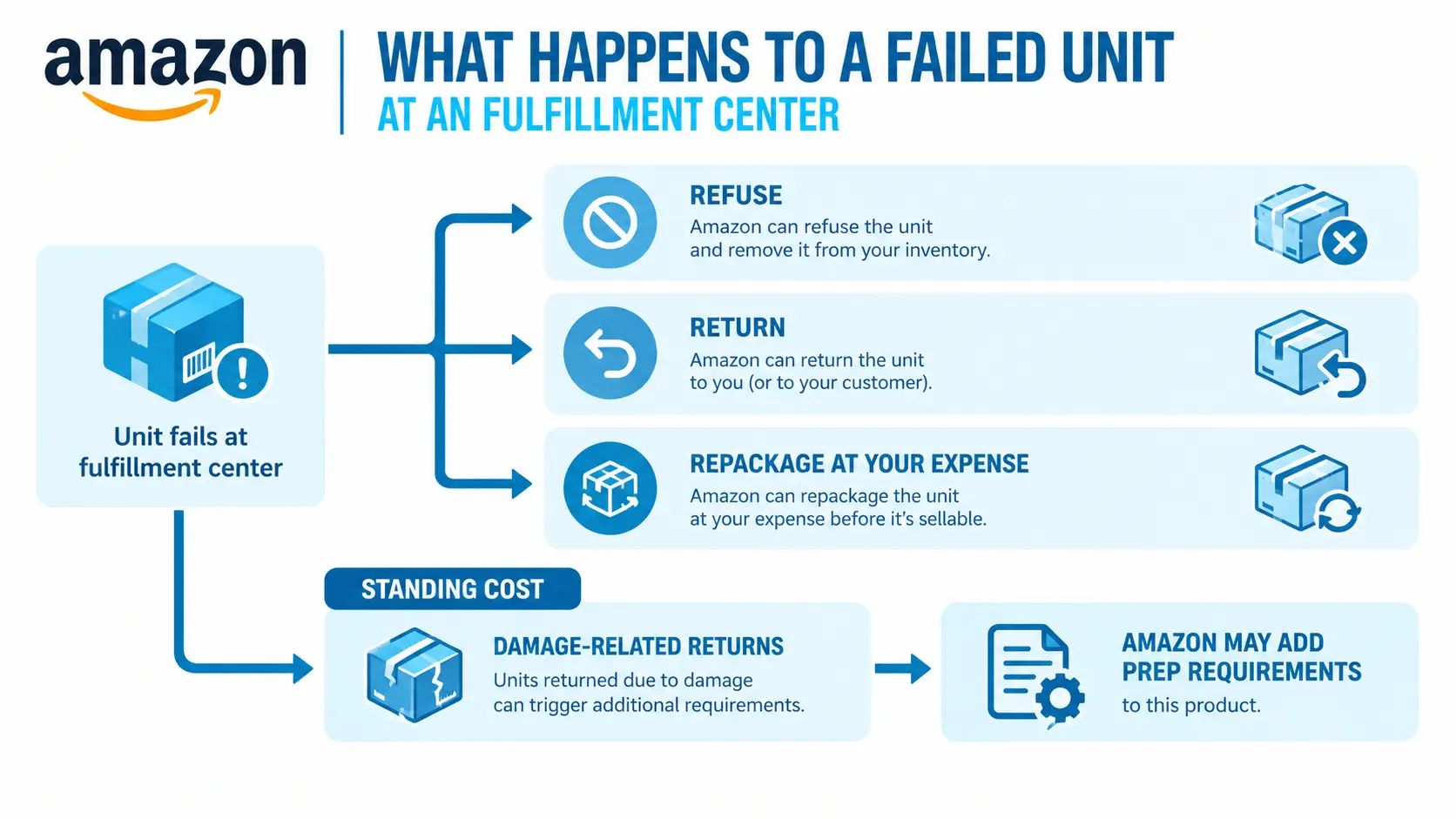
- Removal, disposal, or liquidation when a product fails
- Advertising, the largest omission of all: the calculator does not know your PPC spend
For the full tour of the quiet ones, see the hidden Amazon FBA fees most sellers meet on their first settlement report.
From estimate to true contribution margin
Here is how we map profitability for the brands we manage: at the ASIN level, as true contribution margin after fees, storage, and returns. Not account-level revenue, not gross margin at the factory quote. Per unit, per ASIN:
- Start: sale price
- Minus: referral fee (15% for most categories, verified today)
- Minus: FBA fulfillment fee (from the calculator or your fee preview)
- Minus: landed product cost (factory, freight, duty, prep)
- Minus: allocated monthly storage, returns cost, and ad spend per unit sold
- Equals: true contribution margin
The calculator gives you the first three lines before launch. The last two only show up in your real data after launch, which is why an estimate is a starting point and never a verdict.
The weekly margin review: the discipline behind the tool
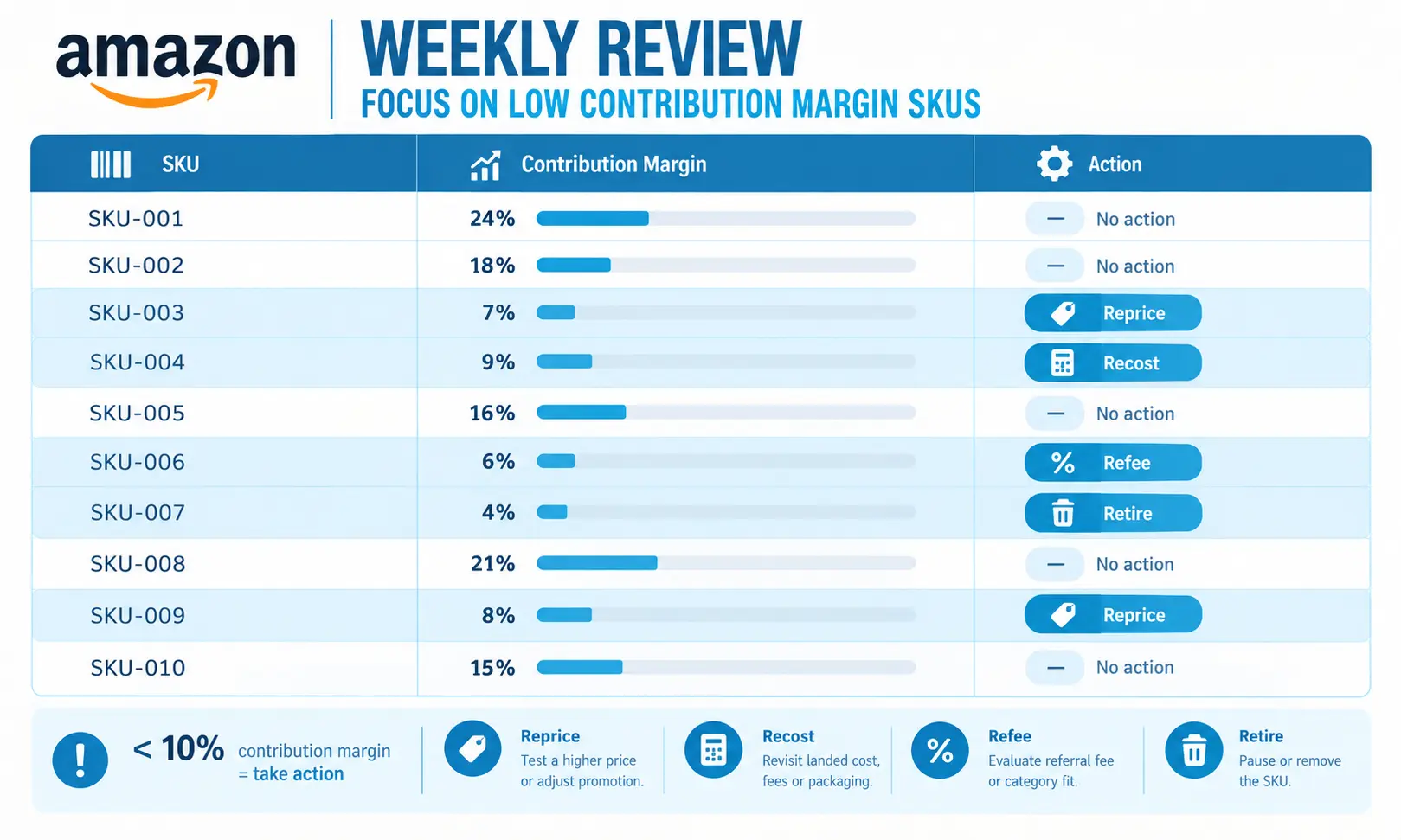
The calculator is the starting point. The weekly margin review is the discipline. In our weekly P&L review, any SKU running under 10% contribution margin gets flagged, and every flag gets one of four responses:
- Reprice: test a higher price if conversion can hold.
- Recost: renegotiate the supplier, freight, or pack size driving the landed cost.
- Refee: audit fees, dimensions, and category; then check for stranded inventory quietly paying storage while earning nothing.
- Retire: exit the SKU before aged surcharges finish the job.
Run that loop weekly and the calculator becomes what it should be: the front door of a margin system, not a one-time reassurance before a large buy.
FBA or your own fulfillment: use the comparison column
The calculator’s side-by-side view exists for one question: does Amazon’s fulfillment fee cost less than you would spend picking, packing, shipping, and handling storage yourself? Fill in your real self-fulfillment costs, including your time, before deciding. For most small teams, heavy or slow-turning products are where self-fulfillment deserves a serious look.
Frequently Asked Questions
Yes. Amazon provides it at no cost, linked from its Estimate fees and costs page at sell.amazon.com, and it opens in Seller Central. You can evaluate products already in Amazon’s catalog or define a new product by category, dimensions, weight, and price.
It previews referral fees, FBA fulfillment fees, monthly storage, and applicable closing fees, then estimates net profit and margin for each fulfillment scenario. Costs like long-term storage surcharges, returns, removals, and advertising are not all built in, so treat the output as a pre-launch estimate.
The usual gaps are advertising spend, returns, aged inventory surcharges, inbound placement charges, and price drops the estimate never saw. Compare the estimate against your settlement reports after 60 to 90 days of sales, then recalculate with real numbers.
There is no universal number, but a working benchmark from our own reviews: any SKU under 10% contribution margin after fees, storage, and returns gets flagged for repricing, cost work, or retirement. Healthy catalogs hold most SKUs comfortably above that line.
Keep the Math Honest After Launch
A calculator estimates one product on one day. Keeping a whole catalog profitable is weekly work: fee audits, storage control, and margin flags before they become losses.
eMarspro has managed marketplace accounts since 2011, supports 300+ brands today, and managed $21.2M in marketplace revenue in 2026 (anonymized). ASIN-level margin tracking is part of our work as an
FBA management company,
scope set in your SOW.