

Ecommerce inventory management is the work of keeping one true stock count behind every channel you sell on. Software earns its place when it does that job: one source of truth, a sync fast enough to stop oversells, and a reorder point that fires before you run out.
Everything else a vendor demos is secondary. This guide covers the six jobs the software has to do, the reorder math Amazon publishes, and the point at which a spreadsheet is still the right answer.
What Ecommerce Inventory Management Has to Do
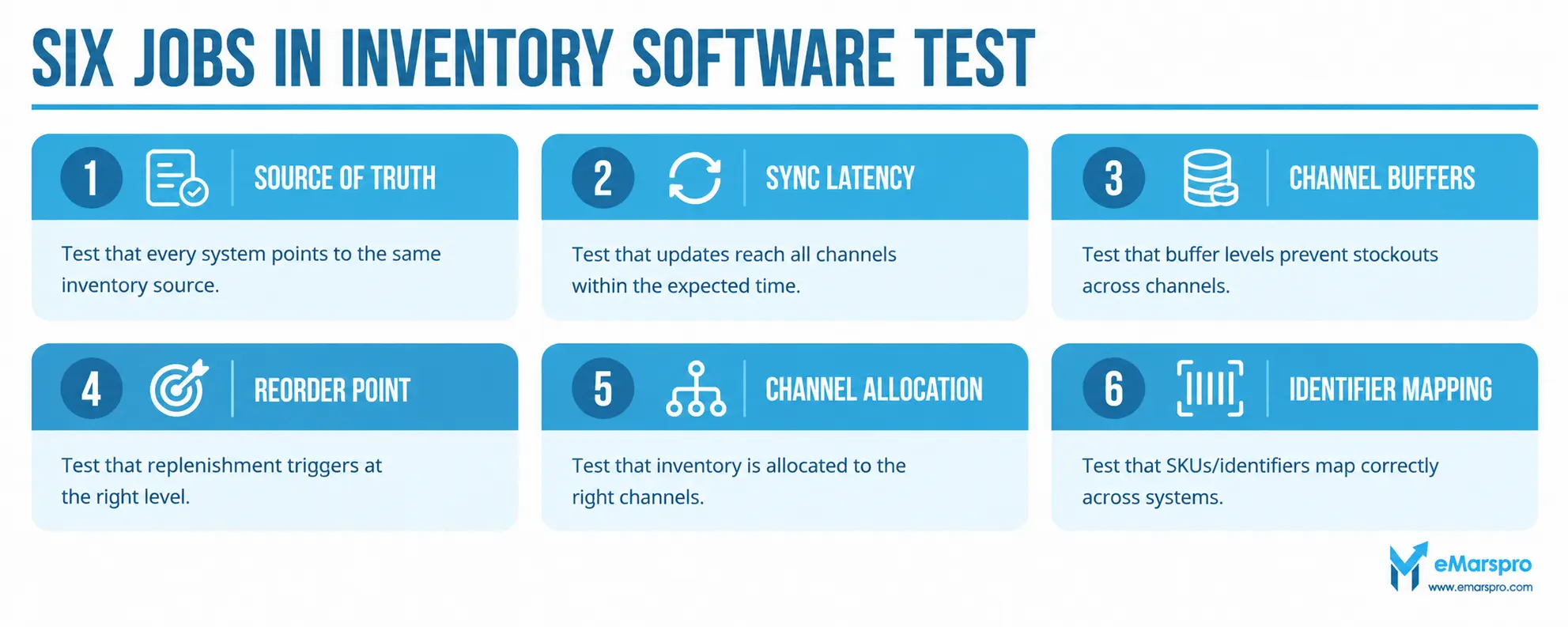
Six jobs. A tool that does five of them well will still lose you sales on the sixth.
| # | The job | What to test before you buy | What failure looks like |
|---|---|---|---|
| 1 | One source of truth | Which system owns the number, and can every channel read from it | Two systems disagree and staff pick the one they trust |
| 2 | Sync latency | How many minutes between a sale on one channel and the count dropping on the rest | Oversells clustered around your busiest hour |
| 3 | Per channel buffer | Can you set a different held-back quantity per channel, per SKU | One buffer for everything, so slow channels hoard stock |
| 4 | Reorder point | Does it fire on days of cover, not on a fixed unit threshold | You reorder on a number that made sense last quarter |
| 5 | Channel allocation | Can you split one pool without starving a channel that suddenly moves | A channel runs dry while stock sits reserved elsewhere |
| 6 | Identifier mapping | One product, many identifiers: your SKU, the FNSKU, the channel listing ID | The same unit counted twice under two identifiers |
Jobs 1 to 3 decide whether you oversell. Jobs 4 to 6 decide whether you run out. They are different failures with different fixes, and most buyers only shop for one of them.
Multichannel or Amazon Only: Which Problem Do You Have?
Buyers regularly shop for the wrong category. Find your row first.
| Where you sell | The real problem | Where to look |
|---|---|---|
| Amazon only, FBA | Restock timing and forecast accuracy | Amazon specific tooling. Our Amazon inventory software roundup compares those tools directly |
| Amazon plus Walmart, Shopify or eBay | One stock pool across channels, and oversell prevention | Multichannel platforms, judged against the six jobs above |
| Amazon plus your own warehouse | Pick and pack accuracy inside your own building | Warehouse side systems, then sync outward |
| One channel, under about fifty active SKUs | Nothing a spreadsheet cannot hold | Read “When a Spreadsheet Still Wins” below before you spend |
If the stock count is fine and the problem is that nobody is running the weekly reorder cycle, that is not a software purchase. That is the standing operational work our Amazon FBA management team does for wholesale sellers.
The distinction is worth taking seriously. Walmart’s own system behaves differently from Amazon’s, and a seller who has read how Walmart’s inventory system works will size their buffers differently on each channel.
The Reorder Point Math Amazon Publishes
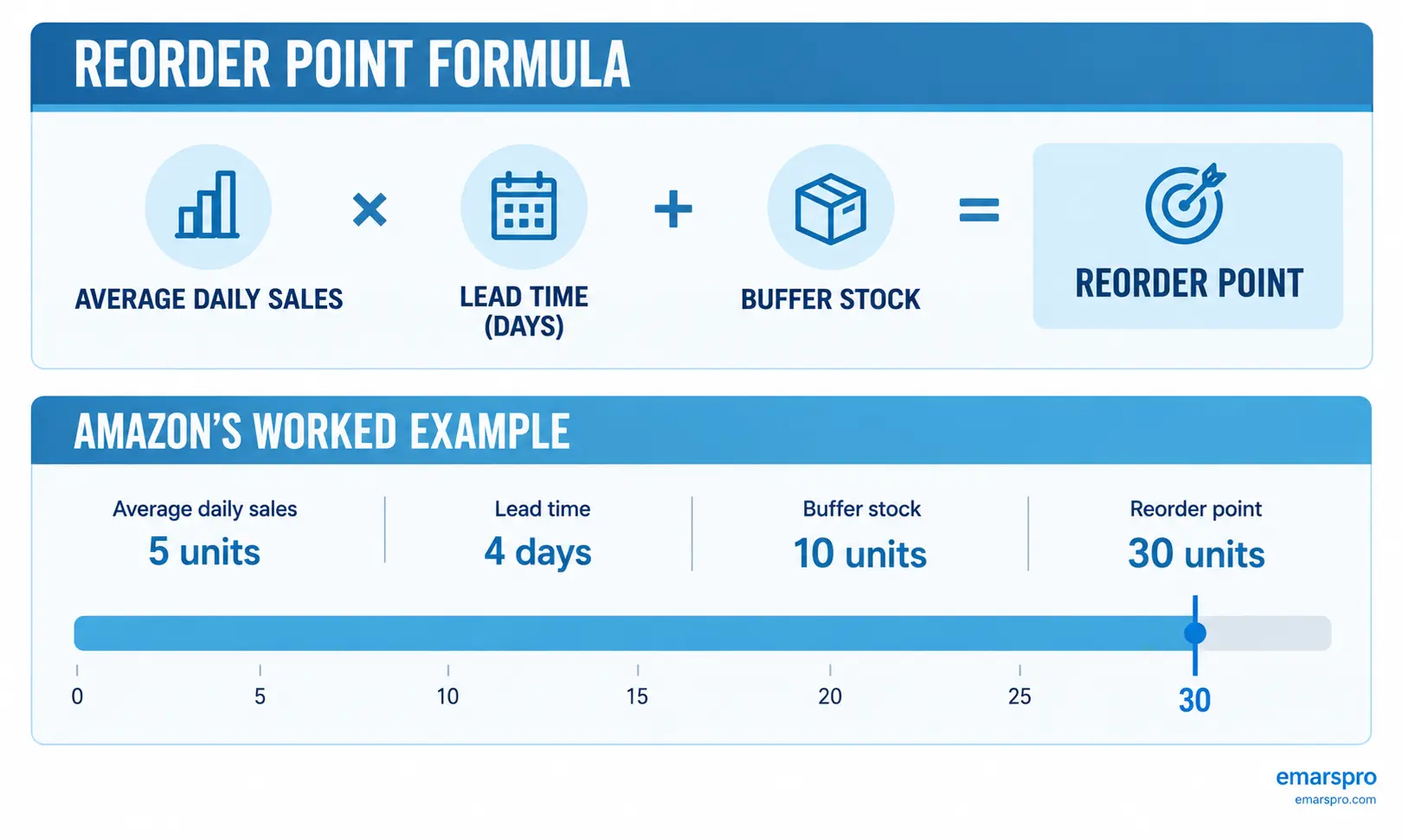
You do not have to invent the rule. Amazon publishes the reorder point formula on its own seller guidance:
Reorder point = (average daily sales multiplied by lead time in days) + buffer stock
Amazon’s own worked example: a product selling five units a day, with a four day lead time and a ten unit buffer, reorders at thirty units.
Four more methods sit alongside it in Amazon’s own inventory guidance, and all four are worth knowing before a vendor demo:
- Par levels: the maximum quantity of a product you want in storage. Set per SKU, not per catalog
- ABC analysis: rank products by revenue contribution so your attention follows your money, not your SKU count
- FIFO: sell the oldest stock first, which matters most where stock ages or dates
- Sell-through rate: units sold divided by units received, the cleanest read on whether a buy was right
Run the reorder point weekly against real lead times, not the lead times your supplier quoted in January. Most restock drama is a lead time that quietly moved.
Where Oversells Actually Come From
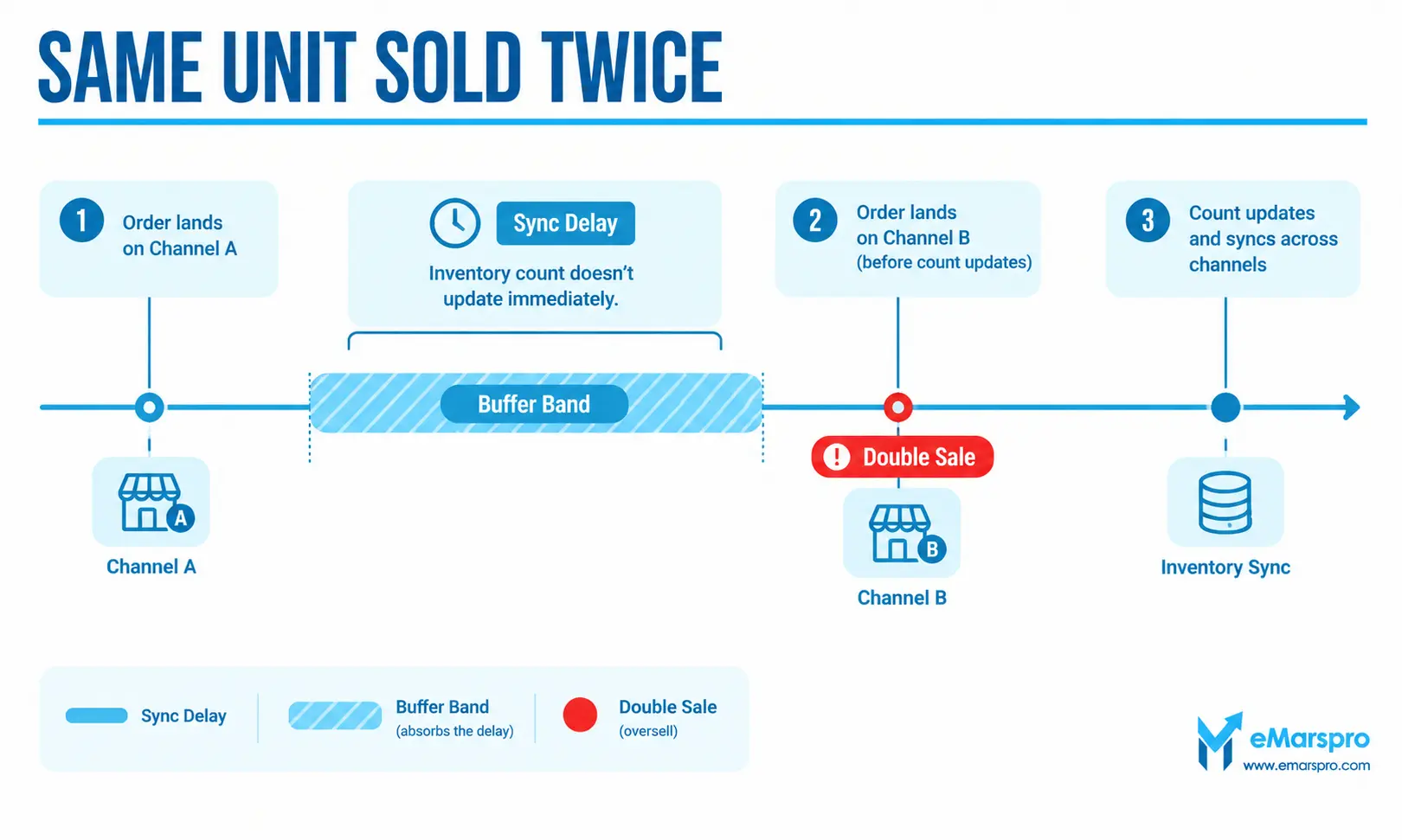
An oversell is almost never a forecasting failure. It is a timing failure.
The unit sells on channel A. Your system takes some number of minutes to hear about it. In that window the same unit sells on channel B. You now owe two customers one item, and the cancellation lands on the account health of whichever marketplace you disappoint.
That means the buffer you hold per channel is not a safety cushion for demand. It is a cushion for your own sync latency. Size it against the delay you measured, not against a round number.
Two structural fixes matter more than any dashboard:
- One pool, many readers. Every channel reads from one count. The moment a second system holds its own count, you have a reconciliation job forever
- Buffers sized per channel. A channel that ships same day needs a larger cushion than one that batches orders overnight
Amazon names two of its own mechanisms for this in its guidance: Multichannel Fulfillment, which fulfills orders from other channels out of your Amazon stock, and Listing Mirror for synchronizing listings across channels. Both reduce the number of separate pools you are asked to reconcile.
When a Spreadsheet Still Wins
Honest answer: more often than vendors say.
- Under roughly fifty active SKUs on one channel: the marketplace’s own reports plus a weekly reorder calculation will beat a subscription you half configure
- Stable demand, one supplier, predictable lead times: the math is small enough to hold by hand
- No staff to own the tool: unowned software drifts out of date and becomes a second wrong number
Software earns its fee at the point where SKU count times channel count exceeds what a person can check weekly, or where a single oversell costs more than a year of the subscription. Both of those are countable. Count them before you buy.
The Buying Test Before You Sign Anything
Take this list to the demo. Ask for each one to be shown live, on your data, not on the vendor’s sandbox.
- Show me the count updating on channel B after a sale on channel A, and time it
- Show me two different buffers on two channels for one SKU
- Show me the reorder point firing on days of cover
- Show me one product carrying my SKU, the FNSKU and the channel listing ID, mapped
- Show me what happens when a channel is offline for an hour and comes back
- Show me the report I would read every Monday, not the executive dashboard
- Show me the export, because one day we will leave
- Tell me who owns the number when your system and the marketplace disagree
If a vendor cannot do the first item on your own data, nothing further in the demo matters.
What Software Does Not Fix
No tool clears stranded inventory for you, because that is a listing problem wearing an inventory costume. No tool absorbs seasonal demand you did not plan for, and none of them argues with a supplier who has quietly pushed your lead time out three weeks.
Forecasting features are genuinely better in 2026 than they were, AI assisted or otherwise. They still flag rather than decide. A forecast is equally confident whether or not it knows your container is sitting at anchor.
Frequently Asked Questions
It is software that holds one stock count for every channel you sell on and updates that count as orders arrive. The useful ones also carry reorder points, per channel buffers and identifier mapping, so a unit sold on one marketplace cannot be sold again on another.
Hold one stock pool in one system that every channel reads from, then give each channel a buffer sized to how long your sync actually takes. Oversells are nearly always a latency problem or a two systems problem, not a forecasting problem.
Amazon publishes it as average daily sales multiplied by lead time in days, plus buffer stock. Amazon’s own worked example: a product selling five units a day, with a four day lead time and a ten unit buffer, reorders at thirty units.
Often not at the start. Seller Central already carries restock recommendations and inventory reports, and a spreadsheet holds a small catalog fine. Choosing Amazon specific tooling is a separate decision from multichannel sync, and our Amazon software roundup covers it.
One pool with per channel buffers usually sells more units, because no channel sits on stock it is not moving. Allocation earns its place only where a channel has a contractual commitment or a fulfillment lead time you cannot break.
Run the Count. Protect the Margin.
That standing discipline across stock counts, restock cycles and Buy Box protection is the daily work of our team as an FBA management company for wholesale sellers. If you want to see where your current setup leaks before you buy anything, take the free account audit and we will send the findings in 48 hours.